
M2W Introduction: Difference between revisions
From ViewSonic Documentation
Created page with "<noinclude> {{Sticky_Menu_Projector |1=M2W_Introduction |2=M2W_Remote_Control |3=M2W_Initial_Setup |4=M2W_Connecting_Power_and_Devices |5=M2W_Using_the_Projector |6=M2W_Operat..." |
No edit summary |
||
| (7 intermediate revisions by one other user not shown) | |||
| Line 14: | Line 14: | ||
{{Top}} | {{Top}} | ||
</noinclude> | </noinclude> | ||
=Package Contents= | =Package Contents= | ||
<gallery mode=" | <gallery mode="nolines" heights=250px widths=250px> | ||
M2W_Projector. | M2W_Projector.PNG| M2W Projector | ||
M2e_Remote.svg| Remote Control | |||
M2e_Power_Cord.svg| Power Cord | |||
M2e_USB_C.svg| USB-C Cable | |||
M2e_Power_Adapter.svg| DC Power Adapter | |||
M2e_Batteries.svg| Batteries | |||
M2e_Carry_Bag.svg| Soft Carrying Bag | |||
M2e_QSG.png| Quick Start Guide | |||
</gallery> | </gallery> | ||
{{Note-yellow| '''NOTE:''' The power cord and video cables included in your package may vary depending on your country. Please contact your local reseller for more information.}} | {{Note-yellow| '''NOTE:''' The power cord and video cables included in your package may vary depending on your country. Please contact your local reseller for more information.}} | ||
| Line 32: | Line 30: | ||
=Projector Overview= | =Projector Overview= | ||
<gallery heights=350px widths=350px mode="nolines"> | <gallery heights=350px widths=350px mode="nolines"> | ||
M2W_Overview_Front. | M2W_Overview_Front.PNG| Front View | ||
M2W_Overview_Bottom. | M2W_Overview_Bottom.PNG| Bottom View | ||
</gallery> | </gallery> | ||
{| class="wikitable" width=45% style="text-align: center"; | {| class="wikitable" width=45% style="text-align: center"; | ||
! style="text-align: center; font-weight:bold; background-color:#c41230; color:#ffffff;" | | ! style="text-align: center; font-weight:bold; background-color:#c41230; color:#ffffff;" | Number | ||
! style="text-align: center; font-weight:bold; background-color:#c41230; color:#ffffff;" | Item | ! style="text-align: center; font-weight:bold; background-color:#c41230; color:#ffffff;" | Item | ||
! style="text-align: center; font-weight:bold; background-color:#c41230; color:#ffffff;" | Description | ! style="text-align: center; font-weight:bold; background-color:#c41230; color:#ffffff;" | Description | ||
|- | |- | ||
| style="font-weight:bold;" | | | style="font-weight:bold;" | 1 | ||
| Lens | | Lens | ||
| Projector Lens | | Projector Lens | ||
|- | |- | ||
| style="font-weight:bold;" | | | style="font-weight:bold;" | 2 | ||
| IR Sensor | |||
| IR Sensor | |||
|- | |||
| style="font-weight:bold;" | 3 | |||
| Auto Focus Camera | | Auto Focus Camera | ||
| Automatically adjusts the focus | | Automatically adjusts the focus | ||
|- | |- | ||
| style="font-weight:bold;" | | | style="font-weight:bold;" | 4 | ||
| | | harmon/kardon Speakers | ||
| | | harmon/kardon speakers | ||
|- | |- | ||
| style="font-weight:bold;" | | | style="font-weight:bold;" | 5 | ||
| Adjustor Foot | | Adjustor Foot | ||
| Stepless adjustment foot | | Stepless adjustment foot | ||
|- | |- | ||
|} | |} | ||
=I/O Ports= | =I/O Ports= | ||
<div class="res-img">[[File: | <div class="res-img">[[File:M2W_IO_Ports.PNG|500px]]</div> | ||
{| class="wikitable" width=45% style="text-align: center"; | {| class="wikitable" width=45% style="text-align: center"; | ||
| Line 83: | Line 70: | ||
| style="font-weight:bold;" | 1 | | style="font-weight:bold;" | 1 | ||
| Power Button | | Power Button | ||
| | | Power On/Off | ||
|- | |- | ||
| style="font-weight:bold;" | 2 | | style="font-weight:bold;" | 2 | ||
| Line 90: | Line 77: | ||
|- | |- | ||
| style="font-weight:bold;" | 3 | | style="font-weight:bold;" | 3 | ||
| | | Audio Out (3.5 mm jack) | ||
| | | 3.5 mm jack audio output socket | ||
|- | |- | ||
| style="font-weight:bold;" | 4 | | style="font-weight:bold;" | 4 | ||
| HDMI<ref>Supports HDCP | | HDMI<ref>Supports HDCP 1.4/HDMI 1.4.</ref> | ||
| HDMI port<ref>iPhone/iPad users will need to buy an additional adapter. To avoid compatibility issues, please use Apple authorized accessories.</ref> | | HDMI port<ref>iPhone/iPad users will need to buy an additional adapter. To avoid compatibility issues, please use Apple authorized accessories.</ref> | ||
|- | |- | ||
| style="font-weight:bold;" | 5 | | style="font-weight:bold;" | 5 | ||
| | | USB-C<ref>Please use the supplied USB-C cable, and ensure your USB-C device can support video transmission as well as charging.</ref> | ||
| | | USB-C port | ||
|- | |- | ||
| style="font-weight:bold;" | 6 | | style="font-weight:bold;" | 6 | ||
| | | USB A (5V/1.5A Out) | ||
| | | USB 2.0 Type A port (USB Reader - FAT32/NTFS) | ||
|- | |- | ||
| style="font-weight:bold;" | 7 | | style="font-weight:bold;" | 7 | ||
| | | MICRO SD | ||
| | | Micro SD socket (SDXC up to 256 GB - FAT32/NTFS) | ||
|- | |- | ||
| style="font-weight:bold;" | 8 | | style="font-weight:bold;" | 8 | ||
| | | DC IN | ||
| | | Power input socket | ||
|} | |} | ||
<references /> | <references /> | ||
| Line 125: | Line 108: | ||
|} | |} | ||
</noinclude> | </noinclude> | ||
{{#seo: | |||
|title=ViewSonic Projectors | |||
|title_mode=append | |||
|keywords=Projectors, M2, M2W, M Series, Introduction | |||
|description= An introduction to the M2W projector. | |||
}} | |||
[[Category:M2W]] | |||
Latest revision as of 08:43, 5 September 2022
Package Contents
-
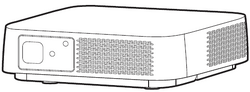 M2W Projector
 -
 Remote Control
 -
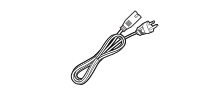 Power Cord
 -
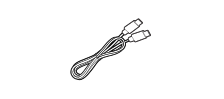 USB-C Cable
 -
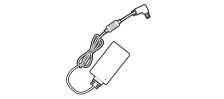 DC Power Adapter
 -
 Batteries
 -
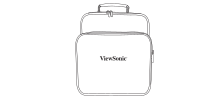 Soft Carrying Bag
 -
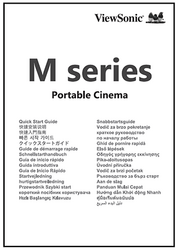 Quick Start Guide


NOTE: The power cord and video cables included in your package may vary depending on your country. Please contact your local reseller for more information.
Projector Overview
-
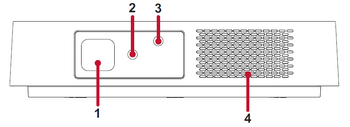 Front View
 -
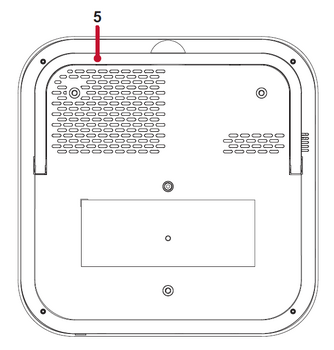 Bottom View


| Number | Item | Description |
|---|---|---|
| 1 | Lens | Projector Lens |
| 2 | IR Sensor | IR Sensor |
| 3 | Auto Focus Camera | Automatically adjusts the focus |
| 4 | harmon/kardon Speakers | harmon/kardon speakers |
| 5 | Adjustor Foot | Stepless adjustment foot |
I/O Ports

| Number | Port | Description |
|---|---|---|
| 1 | Power Button | Power On/Off |
| 2 | LED Indicator | LED Indicator |
| 3 | Audio Out (3.5 mm jack) | 3.5 mm jack audio output socket |
| 4 | HDMI[1] | HDMI port[2] |
| 5 | USB-C[3] | USB-C port |
| 6 | USB A (5V/1.5A Out) | USB 2.0 Type A port (USB Reader - FAT32/NTFS) |
| 7 | MICRO SD | Micro SD socket (SDXC up to 256 GB - FAT32/NTFS) |
| 8 | DC IN | Power input socket |
Further Reading
 |