
LS751HD Remote Control: Difference between revisions
From ViewSonic Documentation
Created page with "<noinclude> {{Sticky_Menu_Projector |1=LS751HD_Introduction |2=LS751HD_Remote_Control |3=LS751HD_Initial_Setup |4=LS751HD_Connecting_Power_and_Devices |5=LS751HD_Using_the_Projector |6=LS751HD_Operation |7=LS751HD_On-Screen_Display_Menu_Tree |8=LS751HD_On-Screen_Display_Menu_Options |9=LS751HD_Specifications |10=LS751HD_Regulatory_and_Service_Information }} </noinclude> =Overview= thumb|250px| Remote Control {| class="wikitabl..." |
|||
| (One intermediate revision by the same user not shown) | |||
| Line 16: | Line 16: | ||
[[File:LS710HD_LS751HD_Remote_Control.JPG|thumb|250px| Remote Control]] | [[File:LS710HD_LS751HD_Remote_Control.JPG|thumb|250px| Remote Control]] | ||
{| class="wikitable" | {| class="wikitable" style="text-align:center; width:60%; background-color:#ffffff;" | ||
! style="font-weight:bold; background-color:# | ! style="font-weight:bold; background-color:#db0025; color:#ffffff;" | Number | ||
! style="text-align: center; font-weight:bold; background-color:# | ! style="text-align: center; font-weight:bold; background-color:#db0025; color:#ffffff;" | Button | ||
! style="text-align: center; font-weight:bold; background-color:# | ! style="text-align: center; font-weight:bold; background-color:#db0025; color:#ffffff;" | Description | ||
|- | |- | ||
| '''1''' | | '''1''' | ||
| Line 121: | Line 121: | ||
# The remote control must be held at an angle within 30° perpendicular to the projector’s IR remote control sensor(s). | # The remote control must be held at an angle within 30° perpendicular to the projector’s IR remote control sensor(s). | ||
# The distance between the remote control and the sensor(s) should not exceed: | # The distance between the remote control and the sensor(s) should not exceed: | ||
:*Font IR:10 m (32.8 ft) | ::*Font IR:10 m (32.8 ft) | ||
:*Top IR: 7 m (23 ft.) | ::*Top IR: 7 m (23 ft.) | ||
:::<small>'''NOTE:''' Refer to the illustration for the location of the infrared (IR) remote control sensor(s).</small> | ::::<small>'''NOTE:''' Refer to the illustration for the location of the infrared (IR) remote control sensor(s).</small> | ||
=Replacing the Batteries= | =Replacing the Batteries= | ||
| Line 129: | Line 129: | ||
# Remove any existing batteries (if necessary) and install two AAA batteries. | # Remove any existing batteries (if necessary) and install two AAA batteries. | ||
:::<small>'''NOTE:''' Observe the battery’s polarities as indicated.</small> | :::<small>'''NOTE:''' Observe the battery’s polarities as indicated.</small> | ||
<ol start="3"><li>Replace the battery cover by aligning it with the base and pushing it back into position. | |||
<div class="res-img">[[File:LS710HD_LS751HD_Replacing_Batteries.JPG| | <div class="res-img">[[File:LS710HD_LS751HD_Replacing_Batteries.JPG|400px]]</div></li></ol> | ||
:::<small>'''NOTE:''' | :::<small>'''NOTE:''' | ||
:::* Avoid leaving the remote control and batteries in excessive heat or a humid environment. | :::* Avoid leaving the remote control and batteries in excessive heat or a humid environment. | ||
| Line 143: | Line 143: | ||
|description= An introduction to the LS751HD projector's remote control. | |description= An introduction to the LS751HD projector's remote control. | ||
}} | }} | ||
[[Category:LS751HD]] | |||
Latest revision as of 07:04, 18 April 2023
Overview

| Number | Button | Description |
|---|---|---|
| 1 | AV Mute | Hides the screen picture and volume mute. |
| 2 | Power | Turns the projector On or Off. |
| 3 | Auto Sync | Automatically determines the best picture timings for the displayed image. |
| 4 | Source | Displays the input source selection bar. |
| 5 | Navigation Buttons | Navigates and selects the desired menu items and make adjustments. |
| 6 | Enter | Confirms the selection. |
| 7 | Menu/Exit | *Turns the On-Screen Display (OSD) Menu On or Off.
|
| 8 | Brightness | Displays the brightness mode selection bar. |
| 9 | Volume Up | Increase the volume level. |
| 10 | Keystone | Manually correct distorted images. |
| 11 | Volume Down | Decrease the volume level. |
| 12 | Video | Unsupported Button |
| 13 | VGA | Unsupported Button |
| 14 | HDMI | Selects the HDMI 1 or HDMI 2 input source. |
| 15 | Aspect | Displays the aspect ratio selection bar. |
| 16 | Page Up | Unsupported Button |
| 17 | Zoom In | Increases the projected image size. |
| 18 | Freeze | Freeze the projected image. |
| 19 | Zoom Out | Reduces the projected image size. |
| 20 | Page Down | Unsupported Button |
| 21 | Display Mode | Displays the color mode selection bar. |
| 22 | Mouse Mode | Unsupported Button |
| 23 | Mute | Mute/Unmute. |
Remote Control - Receiver Range

To ensure proper function of the remote control follow the steps below:
- The remote control must be held at an angle within 30° perpendicular to the projector’s IR remote control sensor(s).
- The distance between the remote control and the sensor(s) should not exceed:
- Font IR:10 m (32.8 ft)
- Top IR: 7 m (23 ft.)
- NOTE: Refer to the illustration for the location of the infrared (IR) remote control sensor(s).
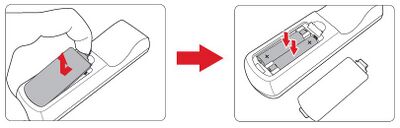
Replacing the Batteries
- Remove the battery cover from the bottom of the remote control by pressing the finger grip and sliding it across.
- Remove any existing batteries (if necessary) and install two AAA batteries.
- NOTE: Observe the battery’s polarities as indicated.
- Replace the battery cover by aligning it with the base and pushing it back into position.

- NOTE:
- Avoid leaving the remote control and batteries in excessive heat or a humid environment.
- Replace only with the same or equivalent type recommended by the battery manufacturer.
- If the battery is drained or if you will not be using the remote control for an extended period of time, remove the battery to avoid damage to the remote control.
- Dispose of used batteries according to the manufacturer’s instructions and local environment regulations for your region.
- NOTE: