
MA1014L MA1214L Introduction
From ViewSonic Documentation
Package Contents
- Touch display
- Power cord
- USB Type C cable
- HDMI cable
- USB 3.0 upstream cable (Type B to Type A)
- Quick start guide
- MPP2.0 Active Pen
- Pen tether
Front View / Rear View
-
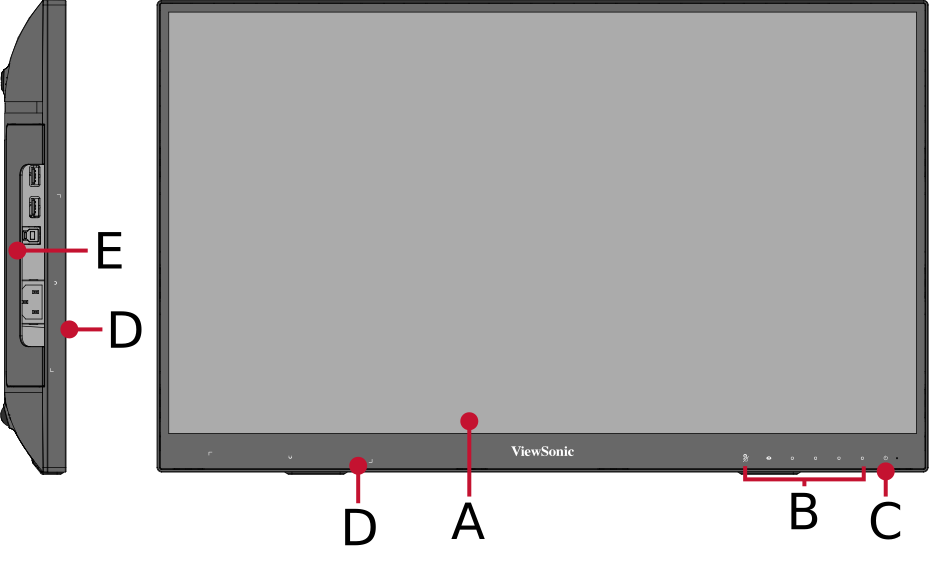 Front View
 -
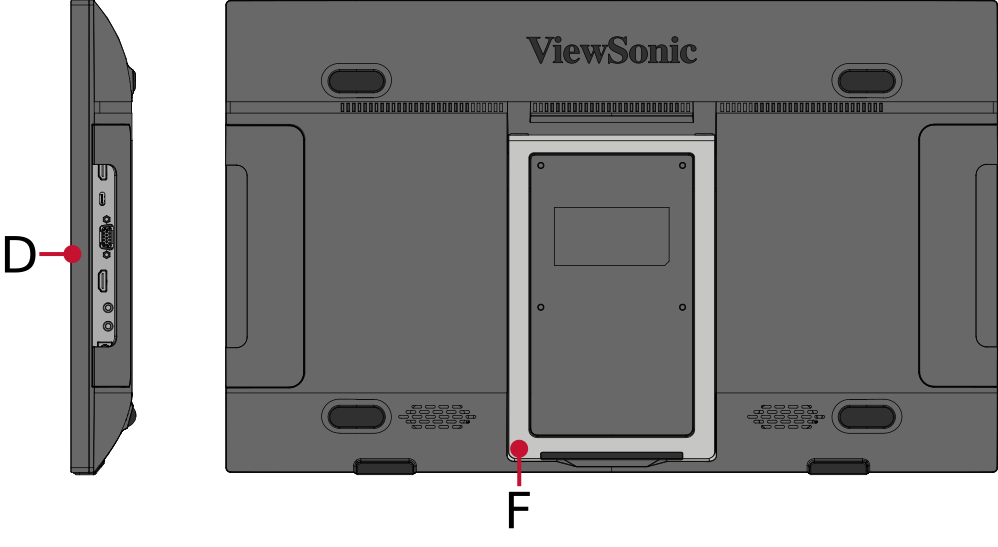 Rear View


| Letter | Item |
|---|---|
| A | Display Screen |
| B | Control Panel Keys |
| C | Power Button |
| D | Magnetic Point |
| E | Pen Tether Anchor Point |
| F | Adjustable Stand |
I/O Overview
Left Side

Right Side

| Number | Item |
|---|---|
| 1 | USB Type-A (Downstream) |
| 2 | USB Type-B (Upstream) |
| 3 | AC IN |
| 4 | HDMI In |
| 5 | USB Type C |
| 6 | VGA |
| 7 | HDMI Out |
| 8 | Audio Out |
| 9 | Audio In |
Pen Overview

Pen Specifications and Recharging
| Item | Specifications | ||
|---|---|---|---|
| Recharging Requirement | Charging voltage: 5V±5% , 4.75~5.25V Charging current: 1A or less Charging cable: Type A to Type C cable Please do not charge for more than 4 hours to avoid battery damage | ||
| Operating Hours | When the battery is fully charged, being used 2 hours a day, it can be used continuously for 50 days. | ||
| Down Button | Eraser Button | ||
| Upper Button | Primary Barrel Button | ||
| Power Consumption | Standby | Hover | Working (Tip on) |
| 0.02mA | 0.15mA | 0.28mA | |
| Pressure Levels | 4096 levels | ||
| Power Saving Mode | Yes, your pen will automatically enter power saving mode after three (3) minutes. To wake, simply start writing. | ||
| Charging Port | USB Type C | ||
| Magnetic Function | Yes; only magnetic adsorption, not attraction charging function. | ||
| LED Flash Mode | Charging | Charging Complete | Low Battery |
| LED On | LED Off | LED Flash | |
NOTE:
- For the first-time recharge of this Microsoft Pen Protocol (MPP) 2.0 pen, please use a 5V/1A recharge device with a USB Type A to Type C cable; do not charge for more than 4 hours to avoid battery damage.
- If a high power consumption charge device is used, it will cause battery damage.
- This Microsoft Pen Protocol (MPP) 2.0 pen does not support Power Delivery (PD) Protocol.
- It is recommended to use a USB Type A to Type C cable and connect to the USB Type A port of the ID2456 to charge the pen.
- The ID2456 display, with Microsoft Pen Protocol (MPP) 2.0, can detect when the pen tip is near the screen. InkView will be able to detect when the pen is close to the screen and visually show a hovering cursor. If the pen tip is pressed, the pen signal transition state will be changed from a hovering cursor to ink mode.
- Please note when using a silicone pen tip cover it will affect the pen’s signal transition state and always stay in ink mode. This may cause drawing or writing inaccuracies.
Further Reading
 |