PX704HD Initial Setup
From ViewSonic Documentation
Choosing a Location - Projector Orientation
Personal preference and room layout will decide the installation location. Consider the following:
- Size and position of your screen.
- Location of a suitable power outlet.
- Location and distance between the projector and other equipment.
The projector is designed to be installed in one of the following locations:
-
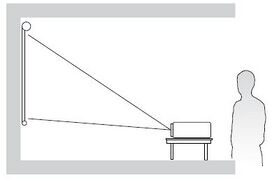 Front Table
 -
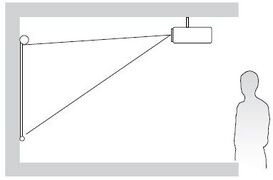 Front Ceiling
 -
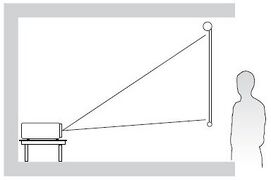 Rear Table
 -
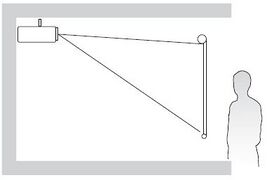 Rear Ceiling


| Location | Description |
|---|---|
| Front Table | The projector is placed near the floor in front of the screen. |
| Front Ceiling | The projector is suspended upside-down from the ceiling in front of the screen. |
| Rear Table[1] | The projector is placed near the floor behind the screen. |
| Rear Ceiling[1] | The projector is suspended upside-down from the ceiling behind the screen. |
Projection Dimensions
16:9 Image on a 16:9 Screen

- NOTE: (e) = Screen | (f) = Center of Lens
| (a) Screen Size | (b) Projection Distance | (c) Image Height | (d) Vertical Offset | ||||||
|---|---|---|---|---|---|---|---|---|---|
| Minimum | Maximum | ||||||||
| in. | mm | in. | mm | in. | mm | in. | mm | in. | mm |
| 30 | 762 | 38.70 | 983 | 42.36 | 1076 | 14.71 | 374 | 2.35 | 60 |
| 40 | 1016 | 51.60 | 1311 | 56.48 | 1435 | 19.61 | 498 | 3.14 | 80 |
| 50 | 1270 | 64.50 | 1638 | 70.60 | 1793 | 24.51 | 623 | 3.92 | 100 |
| 60 | 1524 | 77.40 | 1966 | 84.72 | 2152 | 29.42 | 747 | 4.71 | 120 |
| 70 | 1778 | 90.30 | 2293 | 98.84 | 2510 | 34.32 | 872 | 5.49 | 139 |
| 80 | 2032 | 103.19 | 2621 | 112.96 | 2869 | 39.22 | 996 | 6.28 | 159 |
| 90 | 2286 | 116.09 | 2949 | 127.08 | 3228 | 44.12 | 1121 | 7.06 | 179 |
| 100 | 2540 | 128.99 | 3276 | 141.20 | 3586 | 49.03 | 1245 | 7.84 | 199 |
| 110 | 2794 | 141.89 | 3604 | 155.31 | 3945 | 53.93 | 1370 | 8.63 | 219 |
| 120 | 3048 | 154.79 | 3932 | 169.43 | 4304 | 58.83 | 1494 | 9.41 | 239 |
| 130 | 3302 | 167.69 | 4259 | 183.55 | 4662 | 63.73 | 1619 | 10.20 | 259 |
| 140 | 3556 | 180.59 | 4587 | 197.67 | 5021 | 68.64 | 1743 | 10.98 | 279 |
| 150 | 3810 | 193.49 | 4915 | 211.79 | 5380 | 73.54 | 1868 | 11.77 | 299 |
| 200 | 5080 | 257.99 | 6553 | 282.39 | 7173 | 98.05 | 2491 | 15.69 | 398 |
| 250 | 6350 | 322.48 | 8191 | 352.99 | 8966 | 122.57 | 3113 | 19.61 | 498 |
| 300 | 7620 | 386.95 | 9829 | 423.59 | 10759 | 147.08 | 3736 | 23.53 | 598 |
- NOTE:
- These figures are for reference purposes only. Please refer to the actual projector for the precise dimensions.
- It is recommended that if you intend to permanently install the projector to physically test the projection size and distance using the actual projector before you permanently install it.
16:9 Image on a 4:3 Screen

| (a) Screen Size | (b) Projection Distance | (c) Image Height | (d) Vertical Offset | ||||||
|---|---|---|---|---|---|---|---|---|---|
| Minimum | Maximum | ||||||||
| in. | mm | in. | mm | in. | mm | in. | mm | in. | mm |
| 30 | 762 | 41.13 | 1045 | 45.79 | 1163 | 15.90 | 404 | 2.38 | 61 |
| 60 | 1524 | 82.26 | 2089 | 91.58 | 2326 | 31.80 | 808 | 4.77 | 121 |
| 70 | 1778 | 95.97 | 2438 | 106.85 | 2714 | 37.10 | 942 | 5.56 | 141 |
| 80 | 2032 | 109.67 | 2786 | 122.11 | 3102 | 42.40 | 1077 | 6.36 | 162 |
| 100 | 2540 | 137.09 | 3482 | 152.64 | 3877 | 53 | 1346 | 7.95 | 202 |
| 120 | 3048 | 164.51 | 4179 | 183.17 | 4652 | 63.60 | 1615 | 9.54 | 242 |
| 150 | 3810 | 205.64 | 5223 | 228.96 | 5816 | 79.50 | 2019 | 11.92 | 303 |
| 200 | 5080 | 274.19 | 6964 | 305.28 | 7754 | 106 | 2692 | 15.90 | 404 |
| 250 | 6350 | 342.73 | 8705 | 381.60 | 9693 | 132.5 | 3365 | 19.87 | 505 |
| 300 | 7620 | 411.28 | 10446 | 457.92 | 11631 | 159 | 4039 | 23.85 | 606 |
- NOTE:
- These figures are for reference purposes only. Please refer to the actual projector for the precise dimensions.
- It is recommended that if you intend to permanently install the projector to physically test the projection size and distance using the actual projector before you permanently install it.
Mounting the Projector
- NOTE: If you buy a third party mount, please use the correct screw size. Screw size can vary depending on the thickness of the mounting plate.
- To ensure the most secure installation, please use a ViewSonic® wall or ceiling mount.
- Ensure the screws used to attach the mount to the projector meet the following specifications:
- Screw type: M4 x 7
- Maximum Screw Length: 7 mm

CAUTION
- Avoid installing the projector near a heat source or air conditioner.
- Keep at least a 10 cm (3.9 in.) gap between the ceiling and the bottom of the projector.
Using the Security Bar
To help prevent the projector from being stolen, use a security slot locking device to secure the projector to a fixed object.