
VP2776T-4K On-Screen Display Menu: Difference between revisions
From ViewSonic Documentation
No edit summary |
// via Wikitext Extension for VSCode |
||
| Line 19: | Line 19: | ||
<ol> | <ol> | ||
<li> | <li> | ||
<p>Move the '''Joy Key''' [[File:Icon_Joy_Key_Left.svg|30px]] to display the Startup Menu. Then navigate to '''Main Menu''' and press the '''Joy Key''' [[File:Icon_Joy_Key_Press.svg|30px]] to display the OSD Menu.</p> | <p>Move the '''Joy Key''' [[File:Icon_Joy_Key_Left.svg|30px|link=]] to display the Startup Menu. Then navigate to '''Main Menu''' and press the '''Joy Key''' [[File:Icon_Joy_Key_Press.svg|30px|link=]] to display the OSD Menu.</p> | ||
<div class="res-img">[[File:VP2776_Main_Menu.png|500px| Display the OSD Menu]]</div> | <div class="res-img">[[File:VP2776_Main_Menu.png|500px| Display the OSD Menu]]</div> | ||
</li> | </li> | ||
<li> | <li> | ||
<p>Move the '''Joy Key''' [[File:Icon_Joy_Key_Up.svg|30px]] or [[File:Icon_Joy_Key_Down.svg|30px]] to select the main menu. Then press the '''Joy Key''' [[File:Icon_Joy_Key_Press.svg|30px]] to enter the selected menu.</p> | <p>Move the '''Joy Key''' [[File:Icon_Joy_Key_Up.svg|30px|link=]] or [[File:Icon_Joy_Key_Down.svg|30px|link=]] to select the main menu. Then press the '''Joy Key''' [[File:Icon_Joy_Key_Press.svg|30px|link=]] to enter the selected menu.</p> | ||
<div class="res-img">[[File:VP2776_OSD_Operation_2.png|500px| Display the OSD Menu]]</div> | <div class="res-img">[[File:VP2776_OSD_Operation_2.png|500px| Display the OSD Menu|link=]]</div> | ||
</li> | </li> | ||
<li> | <li> | ||
<p>Move the '''Joy Key''' [[File:Icon_Joy_Key_Up.svg|30px]] or [[File:Icon_Joy_Key_Down.svg|30px]] to select the desired menu option. Then press the '''Joy Key''' [[File:Icon_Joy_Key_Press.svg|30px]] to enter the sub-menu.<p> | <p>Move the '''Joy Key''' [[File:Icon_Joy_Key_Up.svg|30px|link=]] or [[File:Icon_Joy_Key_Down.svg|30px|link=]] to select the desired menu option. Then press the '''Joy Key''' [[File:Icon_Joy_Key_Press.svg|30px|link=]] to enter the sub-menu.<p> | ||
<div class="res-img">[[File:VP2776_OSD_Operation_3.png|500px| Display the OSD Menu]]</div> | <div class="res-img">[[File:VP2776_OSD_Operation_3.png|500px| Display the OSD Menu|link=]]</div> | ||
</li> | </li> | ||
<li> | <li> | ||
<p>Move the '''Joy Key''' [[File:Icon_Joy_Key_Up.svg|30px]] or [[File:Icon_Joy_Key_Down.svg|30px]] to select the desired menu option. Then press the '''Joy Key''' [[File:Icon_Joy_Key_Press.svg|30px]] to enter the sub-menu.<p> | <p>Move the '''Joy Key''' [[File:Icon_Joy_Key_Up.svg|30px|link=]] or [[File:Icon_Joy_Key_Down.svg|30px|link=]] to select the desired menu option. Then press the '''Joy Key''' [[File:Icon_Joy_Key_Press.svg|30px|link=]] to enter the sub-menu.<p> | ||
<div class="res-img">[[File:VP2776_OSD_Operation_3.png|500px| Display the OSD Menu]]</div> | <div class="res-img">[[File:VP2776_OSD_Operation_3.png|500px| Display the OSD Menu|link=]]</div> | ||
</li> | </li> | ||
<li> | <li> | ||
<p>Move the '''Joy Key''' [[File:Icon_Joy_Key_Up.svg|30px]] or [[File:Icon_Joy_Key_Down.svg|30px]] to adjust/select the setting. Then press the '''Joy Key''' [[File:Icon_Joy_Key_Press.svg|30px]] to confirm.<p> | <p>Move the '''Joy Key''' [[File:Icon_Joy_Key_Up.svg|30px|link=]] or [[File:Icon_Joy_Key_Down.svg|30px|link=]] to adjust/select the setting. Then press the '''Joy Key''' [[File:Icon_Joy_Key_Press.svg|30px|link=]] to confirm.<p> | ||
<div class="res-img">[[File:VP2776_OSD_Operation_4.png|500px| Display the OSD Menu]]</div> | <div class="res-img">[[File:VP2776_OSD_Operation_4.png|500px| Display the OSD Menu|link=]]</div> | ||
</li> | </li> | ||
<li> | <li> | ||
<p>Move the '''Joy Key''' [[File:Icon_Joy_Key_Left.svg|30px]] to return to the previous menu.</p> | <p>Move the '''Joy Key''' [[File:Icon_Joy_Key_Left.svg|30px|link=]] to return to the previous menu.</p> | ||
</li> | </li> | ||
</ol> | </ol> | ||
Revision as of 07:56, 9 September 2024
General Operations
-
Move the Joy Key
 to display the Startup Menu. Then navigate to Main Menu and press the Joy Key
  to display the OSD Menu.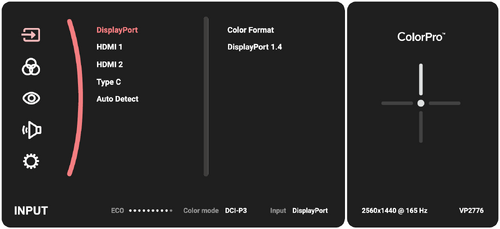
-
Move the Joy Key
 or
or  to select the main menu. Then press the Joy Key to enter the selected menu.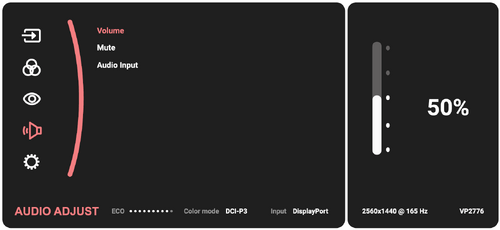
-
Move the Joy Key
or to select the desired menu option. Then press the Joy Key to enter the sub-menu.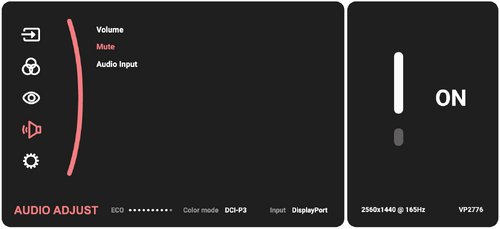
-
Move the Joy Key
or to select the desired menu option. Then press the Joy Key to enter the sub-menu. -
Move the Joy Key
or to adjust/select the setting. Then press the Joy Key to confirm.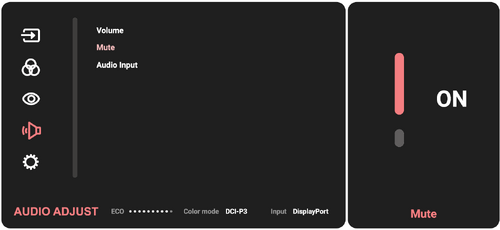
-
Move the Joy Key
to return to the previous menu.
