
VB-STND-007 Introduction: Difference between revisions
From ViewSonic Documentation
No edit summary |
|||
| Line 124: | Line 124: | ||
|'''2''' || Lift Up/Down Buttons ||| Adjust Lift Height | |'''2''' || Lift Up/Down Buttons ||| Adjust Lift Height | ||
|- | |- | ||
|'''3''' || | |'''3''' || RJ45 <ref>Only use the RJ45 port to connect with the Control Pad.</ref> ||| RJ45 Port | ||
|- | |- | ||
|'''4''' || AC Out ||| Power Output Socket | |'''4''' || AC Out ||| Power Output Socket | ||
| Line 132: | Line 132: | ||
<references /> | <references /> | ||
<noinclude> | <noinclude> | ||
===Control Pad=== | ===Control Pad=== | ||
[[File:VB-STND-007 Control Pad.PNG|300px|Control Pad]] | [[File:VB-STND-007 Control Pad.PNG|300px|Control Pad]] | ||
Revision as of 02:52, 26 August 2022
Package Contents

| Letter | Quantity | Description | Note |
|---|---|---|---|
| A | 2 | Bolts | M6 x 14mm |
| B | 6 | Nuts | M8 |
| C | 4 | Bolts | M5 x 25mm |
| D | 4 | Bolts | M6 x 25mm |
| E | 4 | Bolts | M8 x 25mm |
| F | 4 | Bolts | M4 x 8mm |
| G | 1 | Hex Tool | 4mm |
| H | 1 | Wrench | |
| I | 4 | Caster Covers | Left Covers (x2) Right Covers (x2) |
| J | 2 | Attachable Cord Clamps | |
| K | 1 | Control Pad | |
| L | 1 | USB Type A to USB Type A cable |
|
| M | 2 | Trolley Bases | |
| N | 2 | Mounting Brackets | |
| O | 1 | Power Extension Cord | |
| P | 1 | Power Cord | |
| Q | 1 | Keyboard Tray |
- NOTE: The power cord included in your package may vary depending on your country. Please contact your local reseller for more information.
Product Overview
Front and Side View
-
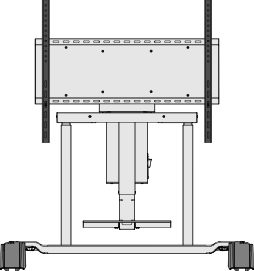 Front View
 -
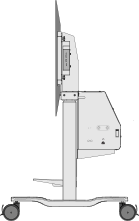 Side View


I/O Ports and Controls

| Number | Port | Description |
|---|---|---|
| 1 | USB A [1] | USB A Port |
| 2 | Lift Up/Down Buttons | Adjust Lift Height |
| 3 | RJ45 [2] | RJ45 Port |
| 4 | AC Out | Power Output Socket |
| 5 | AC In | Power Input Socket |
Control Pad
