
VB-STND-007 Introduction: Difference between revisions
From ViewSonic Documentation
| (22 intermediate revisions by 2 users not shown) | |||
| Line 1: | Line 1: | ||
<noinclude> | <noinclude> | ||
{{Sticky_Menu_VB-STND-007 | {{Sticky_Menu_VB-STND-007 | ||
|1=VB-STND-007_Introduction | |1=VB-STND-007_Introduction | ||
|2=VB-STND-007_Initial_Setup | |2=VB-STND-007_Initial_Setup | ||
|3=VB-STND-007_Making_Connections | |3=VB-STND-007_Making_Connections | ||
|4=VB-STND- | |4=VB-STND-007_Controlling_the_Lift | ||
|5=VB-STND- | |5=VB-STND-007_Appendix | ||
|6 | |6=VB-STND-007_Regulatory_and_Service_Information | ||
}} | }} | ||
</noinclude> | </noinclude> | ||
=Package Contents= | =Package Contents= | ||
[[File:VB-STND-007_Package_Content.svg| | [[File:VB-STND-007_Package_Content.svg|thumb|300px]] | ||
{| class="wikitable" style="text-align:center;" | {| class="wikitable" style="text-align:center;background-color:#ffffff;" | ||
|- style="font-weight:bold; background-color:#c41230; color:#ffffff;" | |- style="font-weight:bold; background-color:#c41230; color:#ffffff;" | ||
!style="text-align: center; font-weight:bold; background-color:#c41230; color:#ffffff;" | Letter | !style="text-align: center; font-weight:bold; background-color:#c41230; color:#ffffff;" | Letter | ||
| Line 104: | Line 103: | ||
| style="text-align:left;" | | | style="text-align:left;" | | ||
|} | |} | ||
{{Note|The power cord included in your package may vary depending on your country. Please contact your local reseller for more information.}} | |||
=Product Overview= | =Product Overview= | ||
===Front and Side View=== | ===Front and Side View=== | ||
< | <gallery widths=300px heights=300px mode="nolines"> | ||
VB-STND-007_Front_View.svg|Front View | |||
VB-STND-007_Side_View.svg|Side View | |||
</gallery> | |||
===I/O Ports and Controls=== | ===I/O Ports and Controls=== | ||
<div class="res-img">[[File:VB-STND-007_IO_Ports.svg|200px]]</div> | <div class="res-img">[[File:VB-STND-007_IO_Ports.svg|200px]]</div> | ||
{| class="wikitable" style="text-align:center; width: 50%;" | {| class="wikitable" style="text-align:center; width: 50%;background-color:#ffffff;" | ||
! style="background-color:#c41230; color:#ffffff;" | Number | ! style="background-color:#c41230; color:#ffffff;" | Number | ||
!! style="background-color:#c41230; color:#ffffff;" | Port | !! style="background-color:#c41230; color:#ffffff;" | Port | ||
!! style="background-color:#c41230; color:#ffffff;" | Description | !! style="background-color:#c41230; color:#ffffff;" | Description | ||
|- | |- | ||
|'''1''' || USB A ||| USB A Port | |'''1''' || USB A <ref>Only use the USB-A port to connect with IFP. Lift can be controlled via the app on the IFP.</ref> ||| USB A Port | ||
|- | |- | ||
|'''2''' || Lift Up/Down Buttons ||| Adjust Lift Height | |'''2''' || Lift Up/Down Buttons ||| Adjust Lift Height | ||
|- | |- | ||
|'''3''' || | |'''3''' || RJ45 <ref>Only use the RJ45 port to connect with the Control Pad.</ref> ||| RJ45 Port | ||
|- | |- | ||
|'''4''' || AC Out ||| Power Output Socket | |'''4''' || AC Out ||| Power Output Socket | ||
| Line 129: | Line 130: | ||
|'''5''' || AC In ||| Power Input Socket | |'''5''' || AC In ||| Power Input Socket | ||
|} | |} | ||
<references /> | |||
<noinclude> | |||
=Control Pad= | ===Control Pad=== | ||
[[File:VB- | [[File:VB-STND-007 Control Pad.PNG|300px|Control Pad]] | ||
{{#seo: | {{#seo: | ||
|title=ViewBoard Accessory | |title=ViewBoard Accessory | ||
|title_mode=append | |title_mode=append | ||
|keywords=ViewBoard | |keywords=ViewBoard, VB-STND-007, stand | ||
|description=Introduction to the ViewBoard VB- | |description=Introduction to the ViewBoard VB-STND-007 Stand. | ||
}} | }} | ||
[[Category:ViewBoard]] | |||
[[Category:VB-STND]] | |||
[[Category:VB-STND-007]] | |||
Latest revision as of 05:33, 27 September 2024
Package Contents

| Letter | Quantity | Description | Note |
|---|---|---|---|
| A | 2 | Bolts | M6 x 14mm |
| B | 6 | Nuts | M8 |
| C | 4 | Bolts | M5 x 25mm |
| D | 4 | Bolts | M6 x 25mm |
| E | 4 | Bolts | M8 x 25mm |
| F | 4 | Bolts | M4 x 8mm |
| G | 1 | Hex Tool | 4mm |
| H | 1 | Wrench | |
| I | 4 | Caster Covers | Left Covers (x2) Right Covers (x2) |
| J | 2 | Attachable Cord Clamps | |
| K | 1 | Control Pad | |
| L | 1 | USB Type A to USB Type A cable |
|
| M | 2 | Trolley Bases | |
| N | 2 | Mounting Brackets | |
| O | 1 | Power Extension Cord | |
| P | 1 | Power Cord | |
| Q | 1 | Keyboard Tray |
Note: The power cord included in your package may vary depending on your country. Please contact your local reseller for more information.
Product Overview
Front and Side View
-
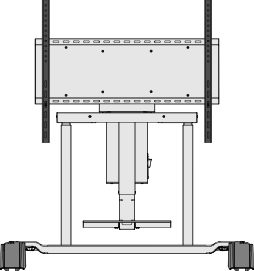 Front View
 -
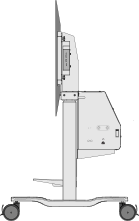 Side View


I/O Ports and Controls

| Number | Port | Description |
|---|---|---|
| 1 | USB A [1] | USB A Port |
| 2 | Lift Up/Down Buttons | Adjust Lift Height |
| 3 | RJ45 [2] | RJ45 Port |
| 4 | AC Out | Power Output Socket |
| 5 | AC In | Power Input Socket |
Control Pad
