
XG2536 Introduction: Difference between revisions
From ViewSonic Documentation
// via Wikitext Extension for VSCode |
// via Wikitext Extension for VSCode |
||
| Line 26: | Line 26: | ||
=Front View / Rear View= | =Front View / Rear View= | ||
<gallery widths=350px heights=350px mode="nolines"> | <gallery widths=350px heights=350px mode="nolines"> | ||
XG2536_Front_View.png|<div style="font-style:normal; text-align:center;">Front View</div> | |||
XG2536_Rear_View.png|<div style="font-style:normal; text-align:center;">Rear View</div> | |||
</gallery> | </gallery> | ||
{{Note|For more information about the [[File:Icon_Joy_Key_Press.svg|30px|link=]] / [[File:Icon_Joy_Key_Up.svg|30px|link=]] / [[File:Icon_Joy_Key_Down.svg|30px|link=]] / [[File:Icon_Joy_Key_Left.svg|30px|link=]] / [[File:Icon_Joy_Key_Right.svg|30px|link=]] key and its functions, refer to [[ | {{Note|For more information about the [[File:Icon_Joy_Key_Press.svg|30px|link=]] / [[File:Icon_Joy_Key_Up.svg|30px|link=]] / [[File:Icon_Joy_Key_Down.svg|30px|link=]] / [[File:Icon_Joy_Key_Left.svg|30px|link=]] / [[File:Icon_Joy_Key_Right.svg|30px|link=]] key and its functions, refer to [[XG2536_Hot_Keys|Hot Keys]].}} | ||
=I/O Ports= | =I/O Ports= | ||
<div class="res-img">[[File: | <div class="res-img">[[File:XG2536_IO.svg|650px|I/O Ports]]</div> | ||
{| class="wikitable" style="text-align:center; width: 60%; background-color:#ffffff;" | {| class="wikitable" style="text-align:center; width: 60%; background-color:#ffffff;" | ||
| Line 40: | Line 40: | ||
|'''1''' || DC IN | |'''1''' || DC IN | ||
|- | |- | ||
|'''2''' || | |'''2''' || HDMI | ||
|- | |- | ||
|'''3''' || | |'''3''' || DisplayPort | ||
|- | |- | ||
|'''4''' || | |'''4''' || USB Type C | ||
|- | |- | ||
|'''5''' || | |'''5''' || Audio Out | ||
|} | |} | ||
| Line 60: | Line 56: | ||
|title=ViewSonic Monitor | |title=ViewSonic Monitor | ||
|title_mode=append | |title_mode=append | ||
|keywords= | |keywords=XG2536, I/O Ports, Front view, Control Panel | ||
|description=An introduction to the | |description=An introduction to the XG2536 monitor's physical layout and I/O. | ||
}} | }} | ||
[[Category: | [[Category:XG2536]] | ||
Revision as of 08:50, 29 August 2024
Package Contents
|
 |
Note: The cables included in your package may vary depending on your country. Please contact your local reseller for more information.
Front View / Rear View
-
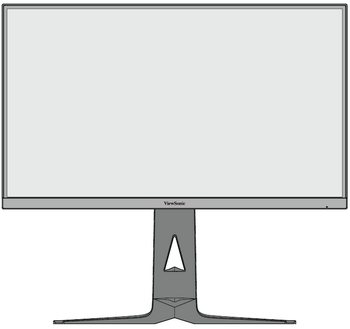 Front View
 -
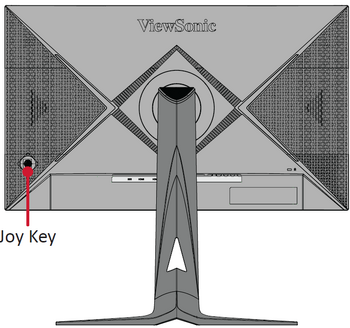 Rear View


I/O Ports

| Number | Item |
|---|---|
| 1 | DC IN |
| 2 | HDMI |
| 3 | DisplayPort |
| 4 | USB Type C |
| 5 | Audio Out |
Further Reading
 |