
MA1014L MA1214L Making Connections: Difference between revisions
From ViewSonic Documentation
| Line 28: | Line 28: | ||
# Restart the computer after the installation completes. | # Restart the computer after the installation completes. | ||
::<div class="res-img">[[File:MA_Series_Pen_Display_Driver.png|400px]]</div> | ::<div class="res-img">[[File:MA_Series_Pen_Display_Driver.png|400px]]</div> | ||
:::<small>'''NOTE:''' For further ViewSign Console information, please visit: | :::<small>'''NOTE:''' For further ViewSign Console information, please visit: [[Pen_Display_Software|Pen Display Software - ViewSonic Pen Display Software]]</small> | ||
=Connecting Device= | =Connecting Device= | ||
Revision as of 10:14, 2 May 2024
Installing Drivers and Software
System Requirements:
Operating system: Windows 10, 11, or later.
PC I/O: USB 2.0/above
Before connecting and using the pen display, it is necessary to install the below software. The software can be downloaded at:
MA1014L/MA1214L Series - Driver and Software Download
DisplayLink Driver
Open the DisplayLink installation file and install the driver.

- NOTE: DisplayLink Driver can be installed through Windows Update when connected to the Internet.
Pen Display Driver
Pen Display Manager can be used to map the active area and adjust the feel of the pen.
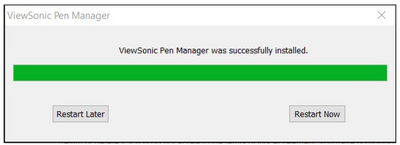
- Open the ViewSign Console installation file and install the driver (ViewSonic Pen Manager).
- Restart the computer after the installation completes.
- NOTE: For further ViewSign Console information, please visit: Pen Display Software - ViewSonic Pen Display Software

Connecting Device

- Connect the Main USB A cable to the computer.
- The Secondary USB A cable can be connected to an AC outlet using the suppliedpower adapter.
- NOTE:
- Power through the secondary USB cable from the AC/DC Adapter willensure a sufficient power supply to avoid screen flicker in case the powerfrom the computer is not stable.
- Customized units may have an additional USB cable for the DocumentCamera. Please also connect this USB cable to the computer.
- NOTE: