VB-STND-007 Initial Setup: Difference between revisions
From ViewSonic Documentation
No edit summary |
|||
| Line 27: | Line 27: | ||
<ol start="1"><li>Lift the IFP up and hook the Mounting Brackets onto the Trolley Cart.</li></ol> | <ol start="1"><li>Lift the IFP up and hook the Mounting Brackets onto the Trolley Cart.</li></ol> | ||
:::'''NOTE:''' It is recommended to perform this step with two or more people to avoid personal injury and/or damage to the IFP and Trolley Cart. | :::'''NOTE:''' It is recommended to perform this step with two or more people to avoid personal injury and/or damage to the IFP and Trolley Cart. | ||
:::<div class="res-img">[[File:Vb-STND-007_Initial_Setup_8.PNG| | :::<div class="res-img">[[File:Vb-STND-007_Initial_Setup_8.PNG|300px]]</div> | ||
<ol start="2"><li>Secure the Mounting Brackets to the Trolley Cart with two M6 x 14mm bolts (A).</li></ol> | <ol start="2"><li>Secure the Mounting Brackets to the Trolley Cart with two M6 x 14mm bolts (A).</li></ol> | ||
:::<div class="res-img">[[File:Vb-STND-007_Initial_Setup_9.PNG| | :::<div class="res-img">[[File:Vb-STND-007_Initial_Setup_9.PNG|300px]]</div> | ||
'''Step 5''' | '''Step 5''' | ||
<ol start="1"><li>Unscrew the M4 x 8mm bolts (F) and remove the Protective Cover from the Trolley Cart. Attach the Chrome Box onto the Trolley Cart.</li></ol> | <ol start="1"><li>Unscrew the M4 x 8mm bolts (F) and remove the Protective Cover from the Trolley Cart. Attach the Chrome Box onto the Trolley Cart.</li></ol> | ||
:::'''NOTE:''' This product does not include an Chrome Box. | :::'''NOTE:''' This product does not include an Chrome Box. | ||
:::<div class="res-img">[[File:Vb-STND-007_Initial_Setup_10.PNG| | :::<div class="res-img">[[File:Vb-STND-007_Initial_Setup_10.PNG|100px|Protective Cover]]</div> | ||
:::<div class="res-img">[[File:Vb-STND-007_Initial_Setup_11.PNG| | :::<div class="res-img">[[File:Vb-STND-007_Initial_Setup_11.PNG|350px]]</div> | ||
{{#seo: | {{#seo: | ||
Revision as of 10:22, 16 August 2022
Assembling the Product
Step 1
- Prepare the following items:


- Align the three holes on the Trolley Base (M) to the bolts underneath the Trolley Body. Using the wrench (H), secure the Trolley Base to the Trolley Body with the nuts (B).

- Ensure all nuts are tightened properly on the assembled Trolley Cart.


Step 2' Attach the Mounting Brackets (N) to the IFP. Depending on the size of the IFP, use either M5 (C), M6 (D), or M8 (E) bolts. Refer to the IFP user guide to find the right bolt size.

Step 3 Attach the Keyboard Tray (Q) to the middle support.

Step 4
- Lift the IFP up and hook the Mounting Brackets onto the Trolley Cart.
- NOTE: It is recommended to perform this step with two or more people to avoid personal injury and/or damage to the IFP and Trolley Cart.
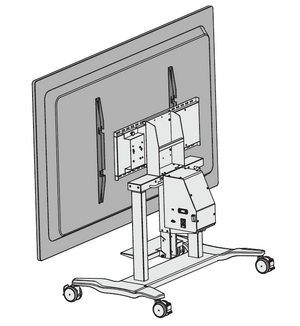

- Secure the Mounting Brackets to the Trolley Cart with two M6 x 14mm bolts (A).

Step 5
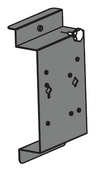
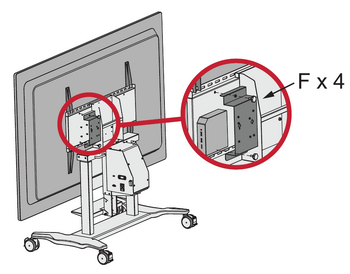
- Unscrew the M4 x 8mm bolts (F) and remove the Protective Cover from the Trolley Cart. Attach the Chrome Box onto the Trolley Cart.
- NOTE: This product does not include an Chrome Box.