
M1+ G2 Introduction: Difference between revisions
From ViewSonic Documentation
Created page with "<noinclude> {{Sticky_Menu_Projector |1=M1+_G2_Introduction |2=M1+_G2_Remote_Control |3=M1+_G2_Initial_Setup |4=M1+_G2_Connecting_Power_and_Devices |5=M1+_G2_Using_the_Projecto..." |
No edit summary |
||
| Line 12: | Line 12: | ||
|10=M1+_G2_Regulatory_and_Service_Information | |10=M1+_G2_Regulatory_and_Service_Information | ||
}} | }} | ||
</noinclude> | |||
=Package Contents= | |||
<gallery mode="traditional"> | |||
M1_mini_Plus_Projector.png| M1 mini Plus Projector | |||
M1_mini_Plus_Remote_Control.png| Remote Control | |||
M1_mini_Plus_QSG.png| Quick Start Guide | |||
M1_mini_Plus_Top_Plates.png| Swappable Top Plate | |||
M1_mini_Plus_Lanyard.png| Lanyard | |||
M1_mini_Plus_Power_Adapter.png| Power Adapter | |||
M1_mini_Plus_Batttery.png| CR2032 Battery<ref>The CR2032 battery is inside the remote control.</ref> | |||
</gallery> | |||
<references /> | |||
=Projector Overview= | |||
<gallery heights=300px widths=300px mode="nolines"> | |||
M1_mini_Plus_overview_1.png| | |||
M1_mini_Plus_overview_2.png| | |||
M1_mini_Plus_overview_3.png| | |||
</gallery> | |||
{| class="wikitable" width=45% style="text-align: center"; | |||
! style="text-align: center; font-weight:bold; background-color:#c41230; color:#ffffff;" | Number | |||
! style="text-align: center; font-weight:bold; background-color:#c41230; color:#ffffff;" | Item | |||
|- | |||
| style="font-weight:bold;" | 1 | |||
| Vent | |||
|- | |||
| style="font-weight:bold;" | 2 | |||
| Smart Stand | |||
|- | |||
| style="font-weight:bold;" | 3 | |||
| IR Receiver | |||
|- | |||
| style="font-weight:bold;" | 4 | |||
| Focus Ring | |||
|- | |||
| style="font-weight:bold;" | 5 | |||
| DC IN (USB-C Port) | |||
|- | |||
| style="font-weight:bold;" | 6 | |||
| USB Type A Port | |||
|- | |||
| style="font-weight:bold;" | 7 | |||
| Speaker | |||
|- | |||
| style="font-weight:bold;" | 8 | |||
| Lens | |||
|- | |||
| style="font-weight:bold;" | 9 | |||
| Top Plate | |||
|- | |||
| style="font-weight:bold;" | 10 | |||
| Power Switch | |||
|- | |||
| style="font-weight:bold;" | 11 | |||
| LED Indicator | |||
|- | |||
| style="font-weight:bold;" | 12 | |||
| IR Receiver | |||
|- | |||
| style="font-weight:bold;" | 13 | |||
| Lanyard Attachment Point | |||
|- | |||
| style="font-weight:bold;" | 14 | |||
| Power Switch | |||
|- | |||
| style="font-weight:bold;" | 15 | |||
| HDMI Port | |||
|} | |||
<noinclude> | |||
=Further Reading= | |||
{| | |||
|- | |||
|<div class="res-img">[[File:Article_What_is_a_Smart_Projector.png|300px|link=https://www.viewsonic.com/library/entertainment/smart-projector/]]</div> | |||
|<div class="res-img">[[File:Article_Projector_vs_TV.png|300px|link=https://www.viewsonic.com/library/entertainment/projector-vs-tv-consideration-to-eye-health/]]</div> | |||
|<div class="res-img">[[File:Article_What_Are_Lumens.png|300px|link=https://www.viewsonic.com/library/tech/what-are-lumens-and-how-to-use-them-to-choose-a-projector/]]</div> | |||
|- | |||
|<div class="res-img">[[File:Article_Choose_Right_Projector.png|300px|link=https://www.viewsonic.com/library/entertainment/choosing-the-right-projector-resolution-for-your-needs/]]</div> | |||
|<div class="res-img">[[File:Article_Projector_vs_TV_for_Fun.png|300px|link=https://www.viewsonic.com/library/entertainment/tvs-vs-projectors-for-home-entertainment/]]</div> | |||
|<div class="res-img">[[File:Article_Lamp_or_Lamp_Free.png|300px|link=https://www.viewsonic.com/library/entertainment/lamp-vs-lamp-free-projectors/]]</div> | |||
|} | |||
</noinclude> | </noinclude> | ||
[[Category:M1+ G2]] | [[Category:M1+ G2]] | ||
Revision as of 09:54, 13 November 2020
Package Contents
-
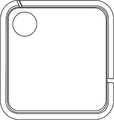 M1 mini Plus Projector
 -
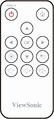 Remote Control
 -
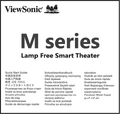 Quick Start Guide
 -
 Swappable Top Plate
 -
 Lanyard
 -
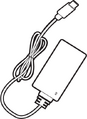 Power Adapter
 -
![CR2032 Battery[1]](/images/thumb/5/57/M1_mini_Plus_Batttery.png/117px-M1_mini_Plus_Batttery.png) CR2032 Battery[1]
CR2032 Battery[1]


![CR2032 Battery[1]](/File:M1_mini_Plus_Batttery.png)
- ↑ The CR2032 battery is inside the remote control.
Projector Overview


| Number | Item |
|---|---|
| 1 | Vent |
| 2 | Smart Stand |
| 3 | IR Receiver |
| 4 | Focus Ring |
| 5 | DC IN (USB-C Port) |
| 6 | USB Type A Port |
| 7 | Speaker |
| 8 | Lens |
| 9 | Top Plate |
| 10 | Power Switch |
| 11 | LED Indicator |
| 12 | IR Receiver |
| 13 | Lanyard Attachment Point |
| 14 | Power Switch |
| 15 | HDMI Port |
Further Reading
 |
 |
 |
 |
 |
 |