
VP2786a-4K Adjusting the Viewing Angle: Difference between revisions
From ViewSonic Documentation
| Line 26: | Line 26: | ||
<table class="table table-borderless""> | <table class="table table-borderless""> | ||
<tr> | <tr> | ||
<td><div class="res-img">[[File: | <td><div class="res-img">[[File:VP2786a-4K_Adjust_Pivot_1.svg|link=|Monitor Pivot]]</div></td> | ||
<td><div class="res-img">[[File: | <td><div class="res-img">[[File:VP2786a-4K_Adjust_Pivot_2.svg|link=|Monitor Pivot]]</div></td> | ||
</tr> | </tr> | ||
<tr> | <tr> | ||
<td><div class="res-img">[[File: | <td><div class="res-img">[[File:VP2786a-4K_Adjust_Pivot_3.svg|link=|Monitor Pivot]]</div></td> | ||
</tr> | </tr> | ||
</table> | </table> | ||
Revision as of 09:13, 6 September 2024
Adjusting the Viewing Angle
Height Adjustment

Lower or raise the monitor to the desired height (0 to 130 mm).
Note: When adjusting, press down firmly along the adjustment track holding the monitor with both hands on the side.
Screen Orientation Adjustment (Monitor Pivot)
 |
 |
 |
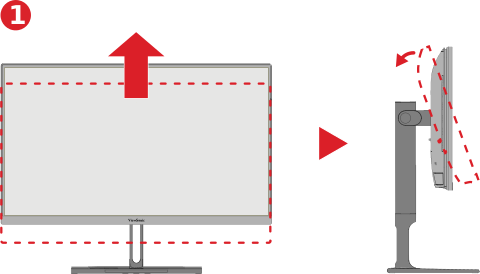
- Adjust the monitor height to the highest position. Then tilt the monitor backwards to the full tilt position.
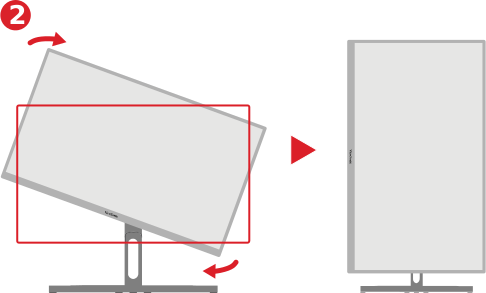
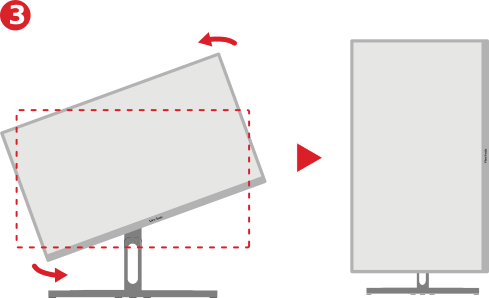
- Rotate the monitor 90° clockwise or counterclockwise from landscape to portrait orientation.
Note:
- When adjusting, make sure to hold both sides of your monitor firmly with both hands.
- If using the Auto Pivot function, the system can detect the screen orientation automatically.
Swivel Adjustment

Swivel the monitor to the left or right for the desired viewing angle (60˚).
Tilt Adjustment

Tilt the monitor forwards or backwards to the desired viewing angle (-5˚ to 21˚).
Note: When adjusting, support the stand firmly with one hand while tilting the monitor forwards or backwards with the other hand.