
PD2211 PD2211T Introduction: Difference between revisions
From ViewSonic Documentation
No edit summary |
No edit summary |
||
| Line 50: | Line 50: | ||
|} | |} | ||
<references /> | <references /> | ||
=I/O Ports= | |||
<div class="res-img">[[File:PD2211_PD2211T_IO.png| 500px | I/O Ports]]</div> | |||
{| class="wikitable" style="text-align:center; width: 40%;" | |||
! style="background-color:#c41230; color:#ffffff;" | Number !! style="background-color:#c41230; color:#ffffff;" | Item | |||
|- | |||
|'''1''' || DC IN | |||
|- | |||
|'''2''' || Audio In | |||
|- | |||
|'''3''' || Audio Out | |||
|- | |||
|'''4''' || VGA | |||
|- | |||
|'''5''' || DVI | |||
|- | |||
|'''6''' || HDMI | |||
|- | |||
|'''7''' || USB Upstream | |||
|- | |||
|'''8''' || USB Downstream | |||
|} | |||
<noinclude> | <noinclude> | ||
=Further Reading= | =Further Reading= | ||
Revision as of 06:17, 7 January 2022
Package Contents

Front View / Rear View
-
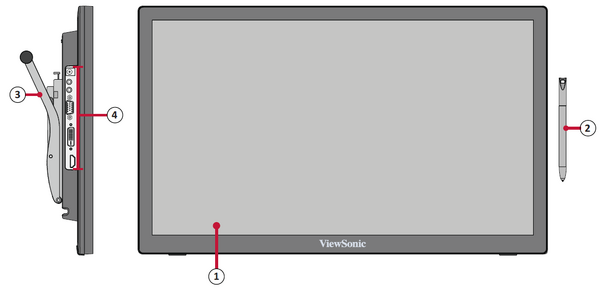 Front View
 -
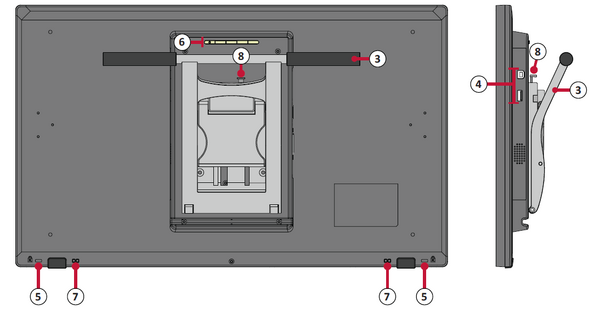 Rear View


| Number | Item |
|---|---|
| 1 | Display Screen/Touch Screen[1] |
| 2 | Pen |
| 3 | Adjustable Stand |
| 4 | I/O Panel |
| 5 | Security Lock Slot |
| 6 | Control Panel |
| 7 | Pen Tether Anchor Point |
- ↑ Touch screen only available on PD2211T
I/O Ports

| Number | Item |
|---|---|
| 1 | DC IN |
| 2 | Audio In |
| 3 | Audio Out |
| 4 | VGA |
| 5 | DVI |
| 6 | HDMI |
| 7 | USB Upstream |
| 8 | USB Downstream |
Further Reading
 |