
LS710HD Initial Setup: Difference between revisions
From ViewSonic Documentation
Created page with "<noinclude> {{Sticky_Menu_Projector |1=LS710HD_Introduction |2=LS710HD_Remote_Control |3=LS710HD_Initial_Setup |4=LS710HD_Connecting_Power_and_Devices |5=LS710HD_Using_the_Projector |6=LS710HD_Operation |7=LS710HD_On-Screen_Display_Menu_Tree |8=LS710HD_On-Screen_Display_Menu_Options |9=LS710HD_Specifications |10=LS710HD_Regulatory_and_Service_Information }} </noinclude> __NOTOC__=Choosing a Location - Projector Orientation= Personal preference and room layout will decide..." |
|||
| (12 intermediate revisions by 2 users not shown) | |||
| Line 18: | Line 18: | ||
* Location of a suitable power outlet. | * Location of a suitable power outlet. | ||
* Location and distance between the projector and other equipment. | * Location and distance between the projector and other equipment. | ||
<gallery mode=" | The projector is designed to be installed in one of the following locations: | ||
<gallery mode="packed"> | |||
LS710HD_LS751HD_Front_Table.JPG| Front | LS710HD_LS751HD_Front_Table.JPG| Front | ||
LS710HD_LS751HD_Front_Ceiling.JPG| Front Ceiling | LS710HD_LS751HD_Front_Ceiling.JPG| Front Ceiling | ||
| Line 24: | Line 25: | ||
LS710HD_LS751HD_Rear_Top.JPG| Rear Ceiling | LS710HD_LS751HD_Rear_Top.JPG| Rear Ceiling | ||
</gallery> | </gallery> | ||
{| class="wikitable" | {| class="wikitable" style="text-align:center; width:60%; background-color:#ffffff;" | ||
! style="font-weight:bold; background-color:# | ! style="font-weight:bold; background-color:#DB0025; color:#ffffff;" | Location | ||
! style="font-weight:bold; background-color:# | ! style="font-weight:bold; background-color:#DB0025; color:#ffffff;" | Description | ||
|- | |- | ||
| style="font-weight:bold;" | Front | | style="font-weight:bold;" | Front | ||
| Line 48: | Line 49: | ||
===16:9 Image on a 16:9 Screen=== | ===16:9 Image on a 16:9 Screen=== | ||
{| class="wikitable" style="text-align: center | {| class="wikitable" style="text-align:center; width:60%; background-color:#ffffff;" | ||
|- | |- | ||
! rowspan="2" colspan="2" style="font-weight:bold; background-color:# | ! rowspan="2" colspan="2" style="font-weight:bold; background-color:#DB0025; color:#ffffff;"| (a) Screen Size | ||
! colspan="4" style="font-weight:bold; background-color:# | ! colspan="4" style="font-weight:bold; background-color:#DB0025; color:#ffffff;"| (b) Projection Distance | ||
! rowspan="2" colspan="2" style="font-weight:bold; background-color:# | ! rowspan="2" colspan="2" style="font-weight:bold; background-color:#DB0025; color:#ffffff;"| (c) Image Height | ||
! rowspan="2" colspan="2" style="font-weight:bold; background-color:# | ! rowspan="2" colspan="2" style="font-weight:bold; background-color:#DB0025; color:#ffffff;"| (d) Vertical Offset | ||
|- | |- | ||
|colspan="2" style="font-weight:bold; background-color:# | |colspan="2" style="font-weight:bold; background-color:#DB0025; color:#ffffff;"| min. | ||
|colspan="2" style="font-weight:bold; background-color:# | |colspan="2" style="font-weight:bold; background-color:#DB0025; color:#ffffff;"| max. | ||
|- | |- | ||
| in. | | '''in.''' | ||
| mm | | '''mm''' | ||
| in. | | '''in.''' | ||
| mm | | '''mm''' | ||
| in. | | '''in.''' | ||
| mm | | '''mm''' | ||
| in. | | '''in.''' | ||
| mm | | '''mm''' | ||
| in. | | '''in.''' | ||
| mm | | '''mm''' | ||
|- | |- | ||
| 40 | | 40 | ||
| Line 101: | Line 102: | ||
| 4.70 | | 4.70 | ||
| 119 | | 119 | ||
| - | |- | ||
| 70 | | 70 | ||
| 1778 | | 1778 | ||
| Line 112: | Line 113: | ||
| 5.49 | | 5.49 | ||
| 139 | | 139 | ||
| - | |- | ||
| 80 | | 80 | ||
| 2032 | | 2032 | ||
| Line 123: | Line 124: | ||
| 6.27 | | 6.27 | ||
| 159 | | 159 | ||
| - | |- | ||
| 90 | | 90 | ||
| 2286 | | 2286 | ||
| Line 134: | Line 135: | ||
| 7.06 | | 7.06 | ||
| 179 | | 179 | ||
| - | |- | ||
| 100 | | 100 | ||
| 2540 | | 2540 | ||
| Line 145: | Line 146: | ||
| 7.84 | | 7.84 | ||
| 199 | | 199 | ||
| - | |- | ||
| 110 | | 110 | ||
| 2794 | | 2794 | ||
| Line 156: | Line 157: | ||
| 8.62 | | 8.62 | ||
| 219 | | 219 | ||
| - | |- | ||
| 120 | | 120 | ||
| 3048 | | 3048 | ||
| Line 167: | Line 168: | ||
| 9.41 | | 9.41 | ||
| 239 | | 239 | ||
| - | |- | ||
| 130 | | 130 | ||
| 3302 | | 3302 | ||
| Line 178: | Line 179: | ||
| 10.19 | | 10.19 | ||
| 259 | | 259 | ||
| - | |- | ||
| 140 | | 140 | ||
| 3556 | | 3556 | ||
| Line 189: | Line 190: | ||
| 10.98 | | 10.98 | ||
| 279 | | 279 | ||
| - | |- | ||
| 150 | | 150 | ||
| 3810 | | 3810 | ||
| Line 200: | Line 201: | ||
| 11.76 | | 11.76 | ||
| 299 | | 299 | ||
| - | |- | ||
| 200 | | 200 | ||
| 5080 | | 5080 | ||
| Line 211: | Line 212: | ||
| 15.70 | | 15.70 | ||
| 399 | | 399 | ||
| - | |- | ||
| 250 | | 250 | ||
| 6350 | | 6350 | ||
| 108.08 | |||
| 2745 | |||
| 108.08 | | 108.08 | ||
| 2745 | | 2745 | ||
| Line 220: | Line 223: | ||
| 19.62 | | 19.62 | ||
| 498 | | 498 | ||
| - | |- | ||
| 300 | | 300 | ||
| 7633 | | 7633 | ||
| Line 233: | Line 236: | ||
|} | |} | ||
: <small>'''NOTE:''' | : <small>'''NOTE:''' | ||
:These figures are for reference purposes only. Please refer to the actual projector for the precise dimensions. | :* These figures are for reference purposes only. Please refer to the actual projector for the precise dimensions. | ||
:It is recommended that if you intend to permanently install the projector to physically test the projection size and distance using the actual projector before you permanently install it. | :* It is recommended that if you intend to permanently install the projector to physically test the projection size and distance using the actual projector before you permanently install it.</small> | ||
===16:9 Image on a | ===16:9 Image on a 4:3 Screen=== | ||
{| class="wikitable" style="text-align: center | {| class="wikitable" style="text-align:center; width:60%; background-color:#ffffff;" | ||
|- | |- | ||
! rowspan="2" colspan="2" style="font-weight:bold; background-color:# | ! rowspan="2" colspan="2" style="font-weight:bold; background-color:#DB0025; color:#ffffff;"| (a) Screen Size | ||
! colspan="4" style="font-weight:bold; background-color:# | ! colspan="4" style="font-weight:bold; background-color:#DB0025; color:#ffffff;"| (b) Projection Distance | ||
! rowspan="2" colspan="2" style="font-weight:bold; background-color:# | ! rowspan="2" colspan="2" style="font-weight:bold; background-color:#DB0025; color:#ffffff;"| (c) Image Height | ||
! rowspan="2" colspan="2" style="font-weight:bold; background-color:# | ! rowspan="2" colspan="2" style="font-weight:bold; background-color:#DB0025; color:#ffffff;"| (d) Vertical Offset | ||
|- | |- | ||
|colspan="2" style="font-weight:bold; background-color:# | |colspan="2" style="font-weight:bold; background-color:#DB0025; color:#ffffff;"| min. | ||
|colspan="2" style="font-weight:bold; background-color:# | |colspan="2" style="font-weight:bold; background-color:#DB0025; color:#ffffff;"| max. | ||
|- | |- | ||
| in. | | '''in.''' | ||
| mm | | '''mm''' | ||
| in. | | '''in.''' | ||
| mm | | '''mm''' | ||
| in. | | '''in.''' | ||
| mm | | '''mm''' | ||
| in. | | '''in.''' | ||
| mm | | '''mm''' | ||
| in. | | '''in.''' | ||
| mm | | '''mm''' | ||
|- | |- | ||
| 40 | | 40 | ||
| Line 269: | Line 272: | ||
| 2.88 | | 2.88 | ||
| 73 | | 73 | ||
| - | |- | ||
| 50 | | 50 | ||
| 1270 | | 1270 | ||
| Line 280: | Line 283: | ||
| 3.60 | | 3.60 | ||
| 91 | | 91 | ||
| - | |- | ||
| 60 | | 60 | ||
| 1524 | | 1524 | ||
| Line 291: | Line 294: | ||
| 4.32 | | 4.32 | ||
| 110 | | 110 | ||
| - | |- | ||
| 70 | | 70 | ||
| 1778 | | 1778 | ||
| 27. | | 27.78 | ||
| 706 | |||
| 27.78 | | 27.78 | ||
| 706 | | 706 | ||
| Line 301: | Line 305: | ||
| 5.04 | | 5.04 | ||
| 128 | | 128 | ||
| - | |- | ||
| 80 | | 80 | ||
| 2032 | | 2032 | ||
| Line 312: | Line 316: | ||
| 5.76 | | 5.76 | ||
| 146 | | 146 | ||
| - | |- | ||
| 90 | | 90 | ||
| 2286 | | 2286 | ||
| Line 323: | Line 327: | ||
| 6.48 | | 6.48 | ||
| 165 | | 165 | ||
| - | |- | ||
| 100 | | 100 | ||
| 2540 | | 2540 | ||
| Line 334: | Line 338: | ||
| 7.20 | | 7.20 | ||
| 183 | | 183 | ||
| - | |- | ||
| 110 | | 110 | ||
| 2794 | | 2794 | ||
| Line 345: | Line 349: | ||
| 7.92 | | 7.92 | ||
| 201 | | 201 | ||
| - | |- | ||
| 120 | | 120 | ||
| 3048 | | 3048 | ||
| Line 356: | Line 360: | ||
| 8.64 | | 8.64 | ||
| 219 | | 219 | ||
| - | |- | ||
| 130 | | 130 | ||
| 3302 | | 3302 | ||
| Line 367: | Line 371: | ||
| 9.36 | | 9.36 | ||
| 238 | | 238 | ||
| - | |- | ||
| 140 | | 140 | ||
| 3556 | | 3556 | ||
| Line 378: | Line 382: | ||
| 10.08 | | 10.08 | ||
| 256 | | 256 | ||
| - | |- | ||
| 150 | | 150 | ||
| 3810 | | 3810 | ||
| Line 389: | Line 393: | ||
| 10.80 | | 10.80 | ||
| 274 | | 274 | ||
| - | |- | ||
| 200 | | 200 | ||
| 5080 | | 5080 | ||
| Line 400: | Line 404: | ||
| 14.40 | | 14.40 | ||
| 366 | | 366 | ||
| - | |- | ||
| 250 | | 250 | ||
| 6350 | | 6350 | ||
| Line 411: | Line 415: | ||
| 18.00 | | 18.00 | ||
| 457 | | 457 | ||
| - | |- | ||
| 300 | | 300 | ||
| 7633 | | 7633 | ||
| Line 424: | Line 428: | ||
|} | |} | ||
: <small>'''NOTE:''' | : <small>'''NOTE:''' | ||
:These figures are for reference purposes only. Please refer to the actual projector for the precise dimensions. | :*These figures are for reference purposes only. Please refer to the actual projector for the precise dimensions. | ||
:It is recommended that if you intend to permanently install the projector to physically test the projection size and distance using the actual projector before you permanently install it. | :*It is recommended that if you intend to permanently install the projector to physically test the projection size and distance using the actual projector before you permanently install it.</small> | ||
=Mounting the Projector= | =Mounting the Projector= | ||
| Line 434: | Line 438: | ||
::* Screw type: M4 x 10 | ::* Screw type: M4 x 10 | ||
::* Maximum Screw Length: 10 mm | ::* Maximum Screw Length: 10 mm | ||
[[File:LS710HD_LS751HD_Mount.JPG|400px]] | [[File:LS710HD_LS751HD_Mount.JPG|400px]]</ol> | ||
{{Note-yellow|'''CAUTION''' | {{Note-yellow|'''CAUTION''' | ||
::* Avoid installing the projector near a heat source or air conditioner. | ::* Avoid installing the projector near a heat source or air conditioner. | ||
::* Keep at least a 10 cm (3.9 in.) gap between the ceiling and the bottom of the projector.}} | ::* Keep at least a 10 cm (3.9 in.) gap between the ceiling and the bottom of the projector.}} | ||
=Using the Security Bar= | =Using the Security Bar= | ||
To help prevent the projector from being stolen, use a security slot locking device to secure the projector to a fixed object. | To help prevent the projector from being stolen, use a security slot locking device to secure the projector to a fixed object. | ||
Latest revision as of 03:04, 17 April 2023
Choosing a Location - Projector Orientation
Personal preference and room layout will decide the installation location. Consider the following:
- Size and position of your screen.
- Location of a suitable power outlet.
- Location and distance between the projector and other equipment.
The projector is designed to be installed in one of the following locations:
-
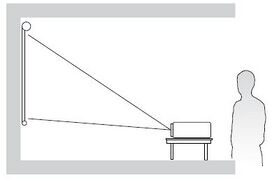 Front
Front -
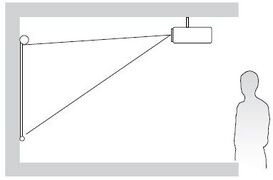 Front Ceiling
 -
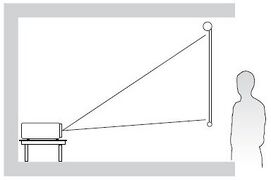 Rear Table
 -
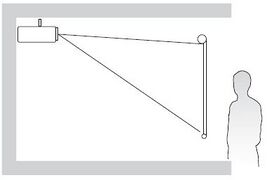 Rear Ceiling


| Location | Description |
|---|---|
| Front | The projector is placed near the floor in front of the screen. |
| Front Ceiling | The projector is suspended upside-down from the ceiling in front of the screen. |
| Rear[1] | The projector is placed near the floor behind the screen. |
| Rear Ceiling[1] | The projector is suspended upside-down from the ceiling behind the screen. |
Projection Dimensions

- NOTE: (e) = Screen | (f) = Center of Lens
16:9 Image on a 16:9 Screen
| (a) Screen Size | (b) Projection Distance | (c) Image Height | (d) Vertical Offset | ||||||
|---|---|---|---|---|---|---|---|---|---|
| min. | max. | ||||||||
| in. | mm | in. | mm | in. | mm | in. | mm | in. | mm |
| 40 | 1016 | 17.29 | 439 | 17.29 | 439 | 19.61 | 498 | 3.14 | 80 |
| 50 | 1270 | 21.62 | 549 | 21.62 | 549 | 24.50 | 622 | 3.92 | 100 |
| 60 | 1524 | 25.94 | 659 | 25.94 | 659 | 29.40 | 747 | 4.70 | 119 |
| 70 | 1778 | 30.26 | 769 | 30.26 | 769 | 34.30 | 871 | 5.49 | 139 |
| 80 | 2032 | 34.58 | 878 | 34.58 | 878 | 39.20 | 996 | 6.27 | 159 |
| 90 | 2286 | 38.91 | 988 | 38.91 | 988 | 44.10 | 1120 | 7.06 | 179 |
| 100 | 2540 | 43.23 | 1098 | 43.23 | 1098 | 49.00 | 1245 | 7.84 | 199 |
| 110 | 2794 | 47.55 | 1208 | 47.55 | 1208 | 53.90 | 1369 | 8.62 | 219 |
| 120 | 3048 | 51.88 | 1318 | 51.88 | 1318 | 58.80 | 1494 | 9.41 | 239 |
| 130 | 3302 | 56.20 | 1427 | 56.20 | 1427 | 63.70 | 1618 | 10.19 | 259 |
| 140 | 3556 | 60.52 | 1537 | 60.52 | 1537 | 68.60 | 1742 | 10.98 | 279 |
| 150 | 3810 | 64.85 | 1647 | 64.85 | 1647 | 73.50 | 1867 | 11.76 | 299 |
| 200 | 5080 | 86.46 | 2196 | 86.46 | 2186 | 98.10 | 2492 | 15.70 | 399 |
| 250 | 6350 | 108.08 | 2745 | 108.08 | 2745 | 122.60 | 3114 | 19.62 | 498 |
| 300 | 7633 | 129.92 | 330 | 129.92 | 3300 | 147.30 | 3741 | 23.57 | 599 |
- NOTE:
- These figures are for reference purposes only. Please refer to the actual projector for the precise dimensions.
- It is recommended that if you intend to permanently install the projector to physically test the projection size and distance using the actual projector before you permanently install it.
16:9 Image on a 4:3 Screen
| (a) Screen Size | (b) Projection Distance | (c) Image Height | (d) Vertical Offset | ||||||
|---|---|---|---|---|---|---|---|---|---|
| min. | max. | ||||||||
| in. | mm | in. | mm | in. | mm | in. | mm | in. | mm |
| 40 | 1016 | 15.87 | 403 | 15.87 | 403 | 18.00 | 457 | 2.88 | 73 |
| 50 | 1270 | 19.84 | 504 | 19.84 | 504 | 22.50 | 572 | 3.60 | 91 |
| 60 | 1524 | 23.81 | 605 | 23.81 | 605 | 27.00 | 686 | 4.32 | 110 |
| 70 | 1778 | 27.78 | 706 | 27.78 | 706 | 31.50 | 800 | 5.04 | 128 |
| 80 | 2032 | 31.74 | 806 | 31.74 | 806 | 36.00 | 914 | 5.76 | 146 |
| 90 | 2286 | 35.71 | 907 | 35.71 | 907 | 40.50 | 1029 | 6.48 | 165 |
| 100 | 2540 | 39.68 | 1008 | 39.68 | 1008 | 45.00 | 1143 | 7.20 | 183 |
| 110 | 2794 | 43.65 | 1109 | 43.65 | 1109 | 49.50 | 1257 | 7.92 | 201 |
| 120 | 3048 | 47.62 | 1209 | 47.62 | 1209 | 54.00 | 1372 | 8.64 | 219 |
| 130 | 3302 | 51.58 | 1310 | 51.58 | 1310 | 58.50 | 1486 | 9.36 | 238 |
| 140 | 3556 | 55.55 | 1411 | 55.55 | 1411 | 63.00 | 1600 | 10.08 | 256 |
| 150 | 3810 | 59.52 | 1512 | 59.52 | 1512 | 67.50 | 1715 | 10.80 | 274 |
| 200 | 5080 | 79.36 | 2016 | 79.36 | 2016 | 90.00 | 2286 | 14.40 | 366 |
| 250 | 6350 | 99.20 | 2520 | 99.20 | 2520 | 112.50 | 2858 | 18.00 | 457 |
| 300 | 7633 | 119.25 | 3029 | 119.25 | 3029 | 135.24 | 3435 | 21.64 | 550 |
- NOTE:
- These figures are for reference purposes only. Please refer to the actual projector for the precise dimensions.
- It is recommended that if you intend to permanently install the projector to physically test the projection size and distance using the actual projector before you permanently install it.
Mounting the Projector
- NOTE: If you buy a third party mount, please use the correct screw size. Screw size can vary depending on the thickness of the mounting plate.
- To ensure the most secure installation, please use a ViewSonic® wall or ceiling mount.
- Ensure the screws used to attach the mount to the projector meet the following specifications:
- Screw type: M4 x 10
- Maximum Screw Length: 10 mm

CAUTION
- Avoid installing the projector near a heat source or air conditioner.
- Keep at least a 10 cm (3.9 in.) gap between the ceiling and the bottom of the projector.
Using the Security Bar
To help prevent the projector from being stolen, use a security slot locking device to secure the projector to a fixed object.