
LS710HD Remote Control: Difference between revisions
From ViewSonic Documentation
No edit summary |
|||
| (5 intermediate revisions by the same user not shown) | |||
| Line 16: | Line 16: | ||
[[File:LS710HD_LS751HD_Remote_Control.JPG|thumb|250px| Remote Control]] | [[File:LS710HD_LS751HD_Remote_Control.JPG|thumb|250px| Remote Control]] | ||
{| class="wikitable" | {| class="wikitable" style="text-align:center; width:60%; background-color:#ffffff;" | ||
! style="font-weight:bold; background-color:# | ! style="font-weight:bold; background-color:#db0025; color:#ffffff;" | Number | ||
! style="text-align: center; font-weight:bold; background-color:# | ! style="text-align: center; font-weight:bold; background-color:#db0025; color:#ffffff;" | Button | ||
! style="text-align: center; font-weight:bold; background-color:# | ! style="text-align: center; font-weight:bold; background-color:#db0025; color:#ffffff;" | Description | ||
|- | |- | ||
| '''1''' | | '''1''' | ||
| AV Mute | | AV Mute | ||
| Hides the screen picture and volume mute. | | style="text-align:left;"|Hides the screen picture and volume mute. | ||
|- | |- | ||
| '''2''' | | '''2''' | ||
| Power | | Power | ||
| Turns the projector On or Off. | | style="text-align:left;"|Turns the projector On or Off. | ||
|- | |- | ||
| '''3''' | | '''3''' | ||
| Auto Sync | | Auto Sync | ||
| Automatically determines the best picture timings for the displayed image. | | style="text-align:left;"|Automatically determines the best picture timings for the displayed image. | ||
|- | |- | ||
| '''4''' | | '''4''' | ||
| Source | | Source | ||
| Displays the input source selection bar. | | style="text-align:left;"|Displays the input source selection bar. | ||
|- | |- | ||
| '''5''' | | '''5''' | ||
| Navigation Buttons | | Navigation Buttons | ||
| Navigates and selects the desired menu items and make adjustments. | | style="text-align:left;"|Navigates and selects the desired menu items and make adjustments. | ||
|- | |- | ||
| '''6''' | | '''6''' | ||
| Enter | | Enter | ||
| Confirms the selection. | | style="text-align:left;"|Confirms the selection. | ||
|- | |- | ||
| '''7''' | | '''7''' | ||
| Menu/Exit | | Menu/Exit | ||
| *Turns the On-Screen Display (OSD) Menu On or Off. | |style="text-align:left;"| | ||
*Turns the On-Screen Display (OSD) Menu On or Off. | |||
*Go back to a previous OSD Menu. | *Go back to a previous OSD Menu. | ||
*Exit and Save menu settings. | *Exit and Save menu settings. | ||
| Line 53: | Line 54: | ||
| '''8''' | | '''8''' | ||
| Brightness | | Brightness | ||
| Displays the brightness mode selection bar. | | style="text-align:left;"|Displays the brightness mode selection bar. | ||
|- | |- | ||
| '''9''' | | '''9''' | ||
| Volume Up | | Volume Up | ||
| Increase the volume level. | | style="text-align:left;"|Increase the volume level. | ||
|- | |- | ||
| '''10''' | | '''10''' | ||
| Keystone | | Keystone | ||
| Manually correct distorted images. | | style="text-align:left;"|Manually correct distorted images. | ||
|- | |- | ||
| '''11''' | | '''11''' | ||
| Volume Down | | Volume Down | ||
| Decrease the volume level. | | style="text-align:left;"|Decrease the volume level. | ||
|- | |- | ||
| '''12''' | | '''12''' | ||
| Video | | Video | ||
| ''Unsupported Button'' | | style="text-align:left;"|''Unsupported Button'' | ||
|- | |- | ||
| '''13''' | | '''13''' | ||
| VGA | | VGA | ||
| ''Unsupported Button'' | | style="text-align:left;"|''Unsupported Button'' | ||
|- | |- | ||
| '''14''' | | '''14''' | ||
| HDMI | | HDMI | ||
| Selects the '''HDMI 1''' or '''HDMI 2''' input source. | | style="text-align:left;"|Selects the '''HDMI 1''' or '''HDMI 2''' input source. | ||
|- | |- | ||
| '''15''' | | '''15''' | ||
| Aspect | | Aspect | ||
| Displays the aspect ratio selection bar. | | style="text-align:left;"|Displays the aspect ratio selection bar. | ||
|- | |- | ||
| '''16''' | | '''16''' | ||
| Page Up | | Page Up | ||
| ''Unsupported Button'' | | style="text-align:left;"|''Unsupported Button'' | ||
|- | |- | ||
| '''17''' | | '''17''' | ||
| Zoom In | | Zoom In | ||
| Increases the projected image size. | | style="text-align:left;"|Increases the projected image size. | ||
|- | |- | ||
| '''18''' | | '''18''' | ||
| Freeze | | Freeze | ||
| Freeze the projected image. | | style="text-align:left;"|Freeze the projected image. | ||
|- | |- | ||
| '''19''' | | '''19''' | ||
| Zoom Out | | Zoom Out | ||
| Reduces the projected image size. | | style="text-align:left;"|Reduces the projected image size. | ||
|- | |- | ||
| '''20''' | | '''20''' | ||
| Page Down | | Page Down | ||
| ''Unsupported Button'' | | style="text-align:left;"|''Unsupported Button'' | ||
|- | |- | ||
| '''21''' | | '''21''' | ||
| Display Mode | | Display Mode | ||
| Displays the color mode selection bar. | | style="text-align:left;"|Displays the color mode selection bar. | ||
|- | |- | ||
| '''22''' | | '''22''' | ||
| Mouse Mode | | Mouse Mode | ||
| ''Unsupported Button'' | | style="text-align:left;"|''Unsupported Button'' | ||
|- | |- | ||
| '''23''' | | '''23''' | ||
| Mute | | Mute | ||
| Mute/Unmute. | | style="text-align:left;"|Mute/Unmute. | ||
|- | |- | ||
|} | |} | ||
=Remote Control - Receiver Range= | =Remote Control - Receiver Range= | ||
[[File:LS710HD_Remote_Control_Effective_Range.JPG|thumb|300px| IR Receiver Location]] | [[File:LS710HD_Remote_Control_Effective_Range.JPG|thumb|300px| IR Receiver Location]] | ||
| Line 121: | Line 123: | ||
# The remote control must be held at an angle within 30° perpendicular to the projector’s IR remote control sensor(s). | # The remote control must be held at an angle within 30° perpendicular to the projector’s IR remote control sensor(s). | ||
# The distance between the remote control and the sensor(s) should not exceed: | # The distance between the remote control and the sensor(s) should not exceed: | ||
:*Font IR:10 m (32.8 ft) | ::*Font IR:10 m (32.8 ft) | ||
:*Top IR: 7 m (23 ft.) | ::*Top IR: 7 m (23 ft.) | ||
:::<small>'''NOTE:''' Refer to the illustration for the location of the infrared (IR) remote control sensor(s).</small> | ::::<small>'''NOTE:''' Refer to the illustration for the location of the infrared (IR) remote control sensor(s).</small> | ||
=Replacing the Batteries= | =Replacing the Batteries= | ||
| Line 129: | Line 131: | ||
# Remove any existing batteries (if necessary) and install two AAA batteries. | # Remove any existing batteries (if necessary) and install two AAA batteries. | ||
:::<small>'''NOTE:''' Observe the battery’s polarities as indicated.</small> | :::<small>'''NOTE:''' Observe the battery’s polarities as indicated.</small> | ||
<ol start="3"><li>Replace the battery cover by aligning it with the base and pushing it back into position. | |||
<div class="res-img">[[File:LS710HD_LS751HD_Replacing_Batteries.JPG| | <div class="res-img">[[File:LS710HD_LS751HD_Replacing_Batteries.JPG|400px]]</div></li></ol> | ||
:::<small>'''NOTE:''' | :::<small>'''NOTE:''' | ||
:::* Avoid leaving the remote control and batteries in excessive heat or a humid environment. | :::* Avoid leaving the remote control and batteries in excessive heat or a humid environment. | ||
| Line 143: | Line 145: | ||
|description= An introduction to the LS710HD projector's remote control. | |description= An introduction to the LS710HD projector's remote control. | ||
}} | }} | ||
[[Category:LS710HD]] | |||
Latest revision as of 09:30, 7 August 2023
Overview

| Number | Button | Description |
|---|---|---|
| 1 | AV Mute | Hides the screen picture and volume mute. |
| 2 | Power | Turns the projector On or Off. |
| 3 | Auto Sync | Automatically determines the best picture timings for the displayed image. |
| 4 | Source | Displays the input source selection bar. |
| 5 | Navigation Buttons | Navigates and selects the desired menu items and make adjustments. |
| 6 | Enter | Confirms the selection. |
| 7 | Menu/Exit |
|
| 8 | Brightness | Displays the brightness mode selection bar. |
| 9 | Volume Up | Increase the volume level. |
| 10 | Keystone | Manually correct distorted images. |
| 11 | Volume Down | Decrease the volume level. |
| 12 | Video | Unsupported Button |
| 13 | VGA | Unsupported Button |
| 14 | HDMI | Selects the HDMI 1 or HDMI 2 input source. |
| 15 | Aspect | Displays the aspect ratio selection bar. |
| 16 | Page Up | Unsupported Button |
| 17 | Zoom In | Increases the projected image size. |
| 18 | Freeze | Freeze the projected image. |
| 19 | Zoom Out | Reduces the projected image size. |
| 20 | Page Down | Unsupported Button |
| 21 | Display Mode | Displays the color mode selection bar. |
| 22 | Mouse Mode | Unsupported Button |
| 23 | Mute | Mute/Unmute. |
Remote Control - Receiver Range

To ensure proper function of the remote control follow the steps below:
- The remote control must be held at an angle within 30° perpendicular to the projector’s IR remote control sensor(s).
- The distance between the remote control and the sensor(s) should not exceed:
- Font IR:10 m (32.8 ft)
- Top IR: 7 m (23 ft.)
- NOTE: Refer to the illustration for the location of the infrared (IR) remote control sensor(s).
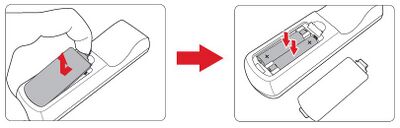
Replacing the Batteries
- Remove the battery cover from the bottom of the remote control by pressing the finger grip and sliding it across.
- Remove any existing batteries (if necessary) and install two AAA batteries.
- NOTE: Observe the battery’s polarities as indicated.
- Replace the battery cover by aligning it with the base and pushing it back into position.

- NOTE:
- Avoid leaving the remote control and batteries in excessive heat or a humid environment.
- Replace only with the same or equivalent type recommended by the battery manufacturer.
- If the battery is drained or if you will not be using the remote control for an extended period of time, remove the battery to avoid damage to the remote control.
- Dispose of used batteries according to the manufacturer’s instructions and local environment regulations for your region.
- NOTE: