
GD1330 Making Connections
From ViewSonic Documentation
Connecting to the Pen Display
The pen display can be connected to a computer by either HDMI and USB Type C, or only USB Type C.
HDMI and USB Type C
- Ensure the power of the computer and pen display are off before connecting them.
- Connect one end of the HDMI cable to the HDMI port of your computer. Then connect the Mini HDMI end of the cable to the Mini HDMI port of the pen display.
- Connect the USB Type A end of the USB cable to your computer. Then connect the USB Type C end to the pen display.
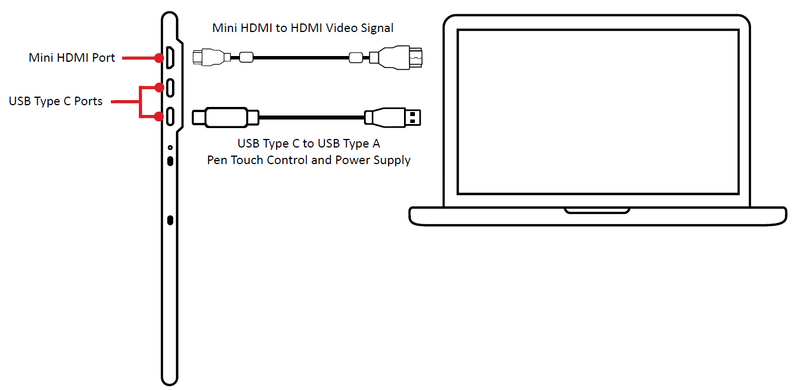
- NOTE: If connected to a desktop computer, and a monitor was already connected to the computer itself, then the tablet and monitor must be connected to the same graphics card of the desktop computer.

Connecting Device

- Connect the Main USB A cable to the computer.
- The Secondary USB A cable can be connected to an AC outlet using the suppliedpower adapter.
- NOTE:
- Power through the secondary USB cable from the AC/DC Adapter willensure a sufficient power supply to avoid screen flicker in case the powerfrom the computer is not stable.
- Customized units may have an additional USB cable for the DocumentCamera. Please also connect this USB cable to the computer.
- NOTE: