
ID1230 Pen Input Area Mapping: Difference between revisions
From ViewSonic Documentation
| Line 27: | Line 27: | ||
:<div class="res-img">[[File:GD1330_Pen_Input_Start_Mac.png|400px]]</div> | :<div class="res-img">[[File:GD1330_Pen_Input_Start_Mac.png|400px]]</div> | ||
<li>Adjustments to the pen can be made by selecting the '''Pen''' tab.</li> | <li>Adjustments to the pen can be made by selecting the '''Pen''' tab.</li> | ||
:<div class="res-img">[[File: | :<div class="res-img">[[File:ID1230_Pen_Display_Manager_Pen_Mac.png|400px]]</div> | ||
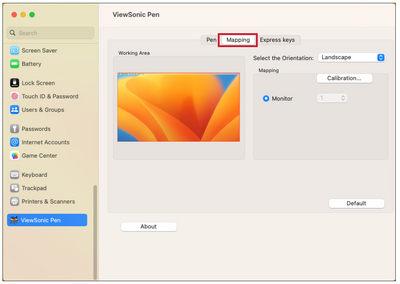
<li>Select the '''Mapping''' tab to adjust screen orientation and display.</li> | <li>Select the '''Mapping''' tab to adjust screen orientation and display.</li> | ||
:<div class="res-img">[[File: | :<div class="res-img">[[File:ID1230_Pen_Display_Manager_Mapping_Mac.png|400px]]</div> | ||
<li>Select the '''Express Keys''' tab to customize the six (6) express keys on the pen display.</li> | <li>Select the '''Express Keys''' tab to customize the six (6) express keys on the pen display.</li> | ||
:<div class="res-img">[[File: | :<div class="res-img">[[File:ID1230_Pen_Display_Manager_Express_Keys_Mac.png|400px]]</div></ol> | ||
{{#seo: | {{#seo: | ||
Revision as of 09:18, 8 June 2023
Pen Input Settings (Windows)
To adjust the pen input settings:
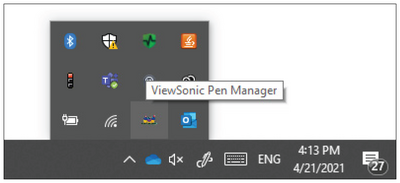
- Open ViewSonic Pen Manager either by going to: Start > ViewSonic Pen Manager or selecting the ViewSonic Pen Manager icon from the System Tray.
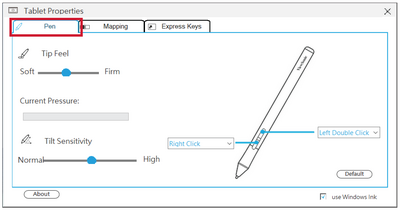
- Adjustments to the pen can be made by selecting the Pen tab.
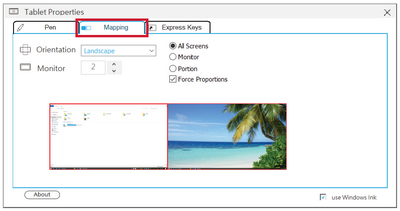
- Select the Mapping tab to adjust screen orientation and display.
- Select the Express Keys tab to customize the six (6) express keys on the pen display.


Pen Input Settings (macOSX)
To adjust the pen input settings:
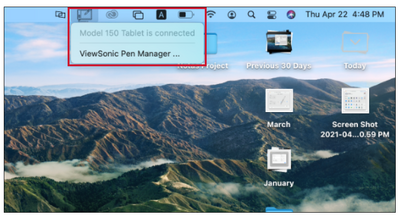
- Open ViewSonic Pen Manager either by going to: Start > ViewSonic Pen Manager or selecting the ViewSonic Pen Manager icon from the System Tray.
- Adjustments to the pen can be made by selecting the Pen tab.

- Select the Mapping tab to adjust screen orientation and display.
- Select the Express Keys tab to customize the six (6) express keys on the pen display.


