
VP3456a Quick Menu: Difference between revisions
From ViewSonic Documentation
| Line 27: | Line 27: | ||
<hr> | <hr> | ||
<br /> | <br /> | ||
<gallery mode=" | <gallery mode="packed" heights=100px widths=100px> | ||
File:VP2756-2K_Standard_Color.png| Standard Color | File:VP2756-2K_Standard_Color.png| Standard Color | ||
File:VP2756-2K_Contrast_Brightness.png| Contrast / Brightness | File:VP2756-2K_Contrast_Brightness.png| Contrast / Brightness | ||
| Line 33: | Line 33: | ||
File:VP3456a_Main_Menu.png| Main Menu | File:VP3456a_Main_Menu.png| Main Menu | ||
</gallery> | </gallery> | ||
{| class="wikitable" | {| class="wikitable" style="background-color:#ffffff; width:60%;" | ||
! style="text-align: center; font-weight:bold; background-color:# | ! style="text-align: center; font-weight:bold; background-color:#DB0025; color:#ffffff;" | Icon | ||
! style="text-align: center; font-weight:bold; background-color:# | ! style="text-align: center; font-weight:bold; background-color:#DB0025; color:#ffffff;" | Name | ||
! style="text-align: center; font-weight:bold; background-color:# | ! style="text-align: center; font-weight:bold; background-color:#DB0025; color:#ffffff;" | Description | ||
|- | |- | ||
| [[File:Icon_Standard_Color.png|50px|link=| Standard Color]] | | [[File:Icon_Standard_Color.png|50px|link=| Standard Color]] | ||
Latest revision as of 10:27, 30 March 2023
Using the Control Panel Keys
Use the control panel keys to access the Quick Access Menu, navigate the On-Screen Display (OSD) Menu, and change the settings.

Quick Menu
Touch the 1/2/3/4 key to activate the Quick menu. Follow the key guide that appears on the screen to select options or make adjustments.

-
 Standard Color
 -
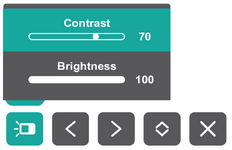 Contrast / Brightness
 -
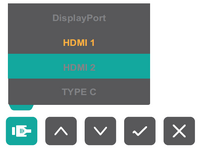 Input Select
 -
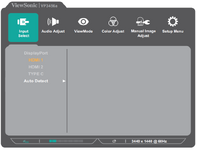 Main Menu


| Icon | Name | Description |
|---|---|---|

|
Standard Color | Select one of the preset standard color settings. |

|
Contrast / Brightness | Adjust the contrast or brightness. |

|
Input Select | Select the input source. |

|
Main Menu | Enter the On-Screen Display (OSD) Menu. |

|
Exit | Exit the Quick Menu. |