
PD0711 Introduction: Difference between revisions
From ViewSonic Documentation
No edit summary |
No edit summary |
||
| Line 15: | Line 15: | ||
|- | |- | ||
! <div class="res-img">[[File:Contents_PD0511_Signature_Pad.svg|200px]]</div> | ! <div class="res-img">[[File:Contents_PD0511_Signature_Pad.svg|200px]]</div> | ||
! <div class="res-img">[[File: | ! <div class="res-img">[[File:Contents_USB.svg|200px]]</div> | ||
! <div class="res-img">[[File:Contents_Pen.svg|200px]]</div> | ! <div class="res-img">[[File:Contents_Pen.svg|200px]]</div> | ||
! <div class="res-img">[[File:Contents_Pen_Nib.svg|100px]]</div> | ! <div class="res-img">[[File:Contents_Pen_Nib.svg|100px]]</div> | ||
|- style="text-align:center;" | |- style="text-align:center;" | ||
| Pen Display | | Pen Display | ||
| USB 2.0,<br />(Type A to | | USB 2.0, 2 in 1 Y-cable<br />(Type A to Type A x 2) | ||
| Pen | | Pen | ||
| Replacement Pen nib x 3 | | Replacement Pen nib x 3 | ||
Revision as of 08:14, 13 September 2021
Package Contents
 |
 |
 |
 |
|---|---|---|---|
| Pen Display | USB 2.0, 2 in 1 Y-cable (Type A to Type A x 2) |
Pen | Replacement Pen nib x 3 |
 |
 |
 |
|
| Pen Tether | Nib removal tool | Quick Start Guide | |
Front View / Rear View
-
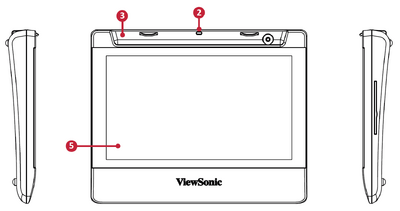 Front View
 -
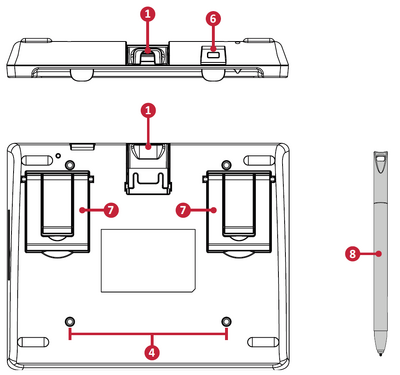 Rear View


| Number | Item |
|---|---|
| 1 | USB Port |
| 2 | Pen Tether Anchor Point |
| 3 | Pen Holder |
| 4 | Wall Mounting Points |
| 5 | Display Screen |
| 6 | Security Lock Sot |
| 7 | Adjustable Stand Leg |
| 8 | Pen |
Further Reading
 |