
VG3219-2K Adjusting the Viewing Angle: Difference between revisions
From ViewSonic Documentation
No edit summary |
No edit summary |
||
| Line 14: | Line 14: | ||
}} | }} | ||
</noinclude> | </noinclude> | ||
<gallery mode="nolines" heights= | <gallery mode="nolines" heights=250px widths=250px> | ||
VG3219-2K_Adjust_Height.png| Height Adjustment | VG3219-2K_Adjust_Height.png| Height Adjustment | ||
VG3219-2K_Adjust_Swivel.png| Swivel Adjustment | VG3219-2K_Adjust_Swivel.png| Swivel Adjustment | ||
VG3219-2K_Adjust_Tilt.png| Tilt Angle Adjustment | VG3219-2K_Adjust_Tilt.png| Tilt Angle Adjustment | ||
</gallery> | </gallery> | ||
===Height Adjustment=== | ===Height Adjustment=== | ||
Lower or raise the monitor to the desired height (0 to 100 mm). | Lower or raise the monitor to the desired height (0 to 100 mm). | ||
| Line 31: | Line 29: | ||
===Swivel Angle Adjustment=== | ===Swivel Angle Adjustment=== | ||
Swivel the monitor to the left or right for the desired viewing angle (360°). | Swivel the monitor to the left or right for the desired viewing angle (360°). | ||
{{#seo: | {{#seo: | ||
Revision as of 08:09, 28 April 2021
-
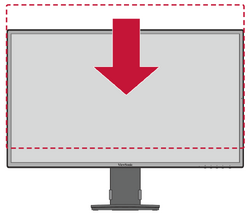 Height Adjustment
 -
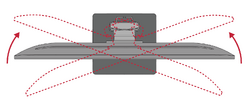 Swivel Adjustment
 -
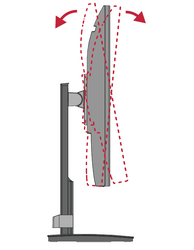 Tilt Angle Adjustment


Height Adjustment
Lower or raise the monitor to the desired height (0 to 100 mm).
- NOTE: When adjusting, press down firmly along the adjustment track.
Tilt Angle Adjustment
Tilt the monitor backwards to the desired viewing angle via the attached stand (-4˚ to 20˚).
- NOTE: When adjusting, support the monitor firmly with one hand while tilting the stand backwards with the other hand.
Swivel Angle Adjustment
Swivel the monitor to the left or right for the desired viewing angle (360°).