VG2709-MHU Initial Setup
From ViewSonic Documentation
Stand Installation


Always place the device on a flat, stable surface. Failure to do so may cause the device to fall and damage the device and/or result in personal injury.
Wall Mounting
Only use UL Certified wall mount kits.
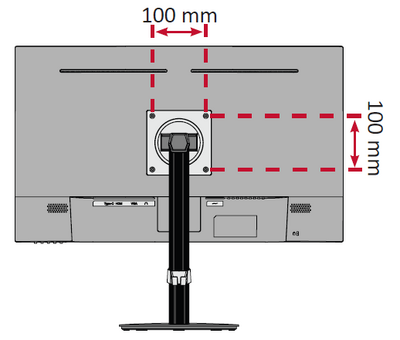
Refer to the table below for the standard dimensions for wall mount kits.
| Maximum Loading | Hole Pattern (W x H) |
Interface Pad (W x H x D) |
Pad Hole | Screw Specification & Quantity |
|---|---|---|---|---|
| 14 kg | 100 x 100 mm | 115 x 115 x 2.6 mm | Ø 5 mm | M4 x 10 mm - 4 pieces |
Wall mount kits are sold separately. To obtain a wall mounting kit, contact ViewSonic® or your local dealer.
- Turn off the device and disconnect all cables.
- Place the device on a flat, stable surface with the screen facing down.
- Remove the monitor stand.
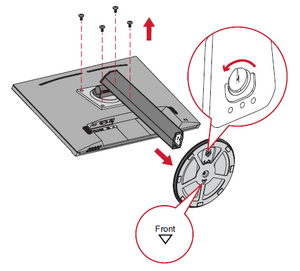
- Attach the mounting bracket to the VESA mounting holes at the rear of the device. Then secure it with four (4) screws (M4 x 10 mm).
- Follow the instructions that come with the wall mounting kit to mount the monitor onto the wall.
