VX2528J Adjusting the Viewing Angle
From ViewSonic Documentation
Adjusting the Viewing Angle
Height Adjustment
Lower or raise the monitor to the desired height (0 to 100 mm).

Note: When adjusting, press down firmly along the adjustment track holding the monitor with both hands on the side.
Screen Orientation Adjustment (Pivot)
-
Adjust the monitor height to the highest position. Then tilt the monitor backwards to the full tilt position.
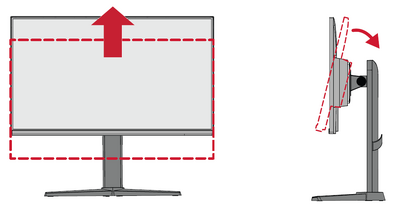
-
Rotate the monitor 90° clockwise or counterclockwise from landscape to portrait orientation.
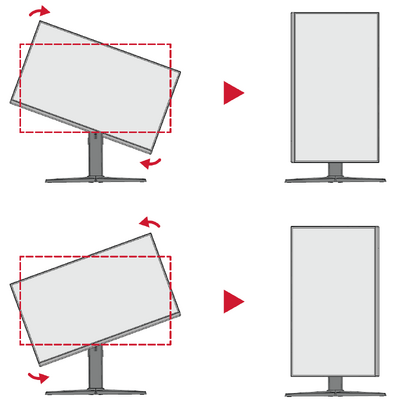 Note:
Note:- When adjusting, make sure to hold both sides of your monitor firmly with both hands
- To rotate the screen image, manually change the system’s display orientation settings.


Tilt Angle Adjustment
Tilt the monitor backwards to the desired viewing angle via the attached stand (-5˚ to 22˚).

- NOTE: When adjusting, support the monitor firmly with one hand while tilting the stand backwards with the other hand.