
VA2214-H VA2214-MH Initial Setup: Difference between revisions
From ViewSonic Documentation
| Line 43: | Line 43: | ||
<li>Place the device on a flat, stable surface with the screen facing down.</li> | <li>Place the device on a flat, stable surface with the screen facing down.</li> | ||
<li>Remove the monitor stand.</li> | <li>Remove the monitor stand.</li> | ||
:<div class="res-img">[[File:VA2214-H_VA2214-MH_Stand_Remove.png| | :<div class="res-img">[[File:VA2214-H_VA2214-MH_Stand_Remove.png|450px]]</div> | ||
<li>Attach the mounting bracket to the VESA mounting holes at the rear of the monitor. Then secure it with four (4) screws (M4 x 10 mm).</li> | <li>Attach the mounting bracket to the VESA mounting holes at the rear of the monitor. Then secure it with four (4) screws (M4 x 10 mm).</li> | ||
<li>Follow the instructions that come with the mounting kit to mount the monitor.</li></ol> | <li>Follow the instructions that come with the mounting kit to mount the monitor.</li></ol> | ||
Revision as of 07:47, 18 June 2024
Installing the Stand

Always place the device on a flat, stable surface. Failure to do so may cause the device to fall and damage the device and/or result in personal injury.
Removing the Stand and Mounting the Display
Refer to the table below for the standard dimensions for mounting kits.
For use only with a UL certified mount kit/bracket. To obtain a wall-mounting kit or height adjustment base, contact ViewSonic® or your local dealer.

| Maximum Loading | Hole Pattern (W x H) | Interface Pad (W x H x D) | Pad Hole | Screw Specification | Quantity |
|---|---|---|---|---|---|
| 14 kg | 100 x 100 mm | 115 x 115 x 2.6 mm | Ø 5 mm | M4 x 10 mm | 4 screws |
- Turn off the device and disconnect all cables.
- Place the device on a flat, stable surface with the screen facing down.
- Remove the monitor stand.
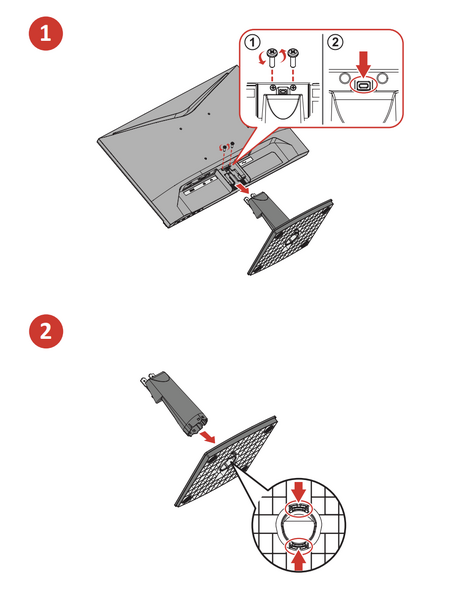
- Attach the mounting bracket to the VESA mounting holes at the rear of the monitor. Then secure it with four (4) screws (M4 x 10 mm).
- Follow the instructions that come with the mounting kit to mount the monitor.

Using the Security Slot
To help prevent the device from being stolen, use a security slot locking device to secure the device to a fixed object.
Additionally, fastening the monitor to a wall or fixed object using a security cable can help support the weight of the monitor in order to prevent the monitor from falling over.
Below is an example of setting up a security slot locking device on a table.
