
VA2433-H Hot Keys: Difference between revisions
From ViewSonic Documentation
| Line 24: | Line 24: | ||
When the menu appears on the screen, continue holding the key for 10 seconds to lock/unlock the OSD Menu. | When the menu appears on the screen, continue holding the key for 10 seconds to lock/unlock the OSD Menu. | ||
<center><div class="res-img">[[File:Monitor_Hot_Key_OSD.png|250px]]</div></center> | <center><div class="res-img">[[File:Monitor_Hot_Key_OSD.png|link=|250px]]</div></center> | ||
If the OSD Menu is locked, the below message will appear on the screen: | If the OSD Menu is locked, the below message will appear on the screen: | ||
| Line 33: | Line 33: | ||
When the menu appears on the screen, continue holding the key for 10 seconds to lock/unlock the '''Power''' button. | When the menu appears on the screen, continue holding the key for 10 seconds to lock/unlock the '''Power''' button. | ||
<center><div class="res-img">[[File:Monitor_Hot_Key_Power.png|250px]]</div></center> | <center><div class="res-img">[[File:Monitor_Hot_Key_Power.png|link=|250px]]</div></center> | ||
If the '''Power''' button is locked, the below message will appear on the screen: | If the '''Power''' button is locked, the below message will appear on the screen: | ||
Revision as of 03:35, 10 July 2023
Hot Keys
When the On-Screen Display (OSD) Menu is off, you can quickly access special functions by using the Joy Key.
| Key | Description |
|---|---|
 |
Press and hold the key to lock/unlock the OSD Menu.
When the menu appears on the screen, continue holding the key for 10 seconds to lock/unlock the OSD Menu. 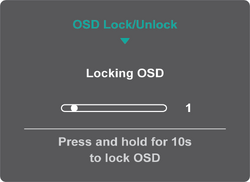 If the OSD Menu is locked, the below message will appear on the screen:  |
 |
Press and hold the key to lock/unlock the Power button.
When the menu appears on the screen, continue holding the key for 10 seconds to lock/unlock the Power button. 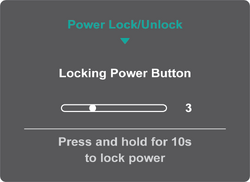 If the Power button is locked, the below message will appear on the screen:  |