
PD0511 Introduction: Difference between revisions
From ViewSonic Documentation
No edit summary |
No edit summary |
||
| Line 1: | Line 1: | ||
<noinclude> | <noinclude> | ||
{{ | {{Sticky_Menu_Pen_Display_No_Adj | ||
|1=PD0511_Introduction | |1=PD0511_Introduction | ||
|2=PD0511_Making_Connections | |2=PD0511_Making_Connections | ||
|3= | |3=PD0511_Using_the_Display | ||
|4= | |4=PD0511_Setting_the_Display_Area | ||
|5= | |5=PD0511_Pen_Input_Area_Mapping | ||
|6= | |6=PD0511_Specifications | ||
|7 | |7=PD0511_Regulatory_and_Service_Information | ||
}} | }} | ||
</noinclude> | </noinclude> | ||
Revision as of 07:56, 13 September 2021
Package Contents
 |
 |
 |
 |
|---|---|---|---|
| Pen Display | USB 2.0, (Type A to Micro USB) |
Pen | Replacement Pen nib x 3 |
 |
 |
 |
|
| Pen Tether | Nib removal tool | Quick Start Guide | |
Front View / Rear View
-
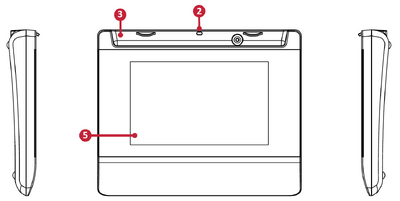 Front View
 -
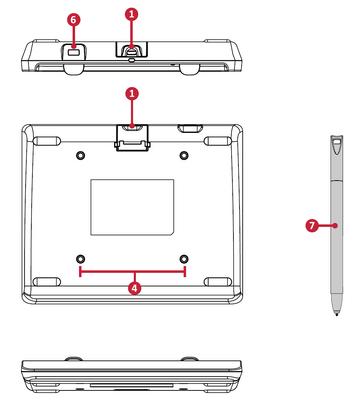 Rear View


| Number | Item |
|---|---|
| 1 | Micro USB Port |
| 2 | Pen Tether Anchor Point |
| 3 | Pen Holder |
| 4 | Wall Mounting Points |
| 5 | Display Screen |
| 6 | Security Lock Sot |
| 7 | Pen |
Further Reading
 |