
ID1655 Introduction: Difference between revisions
From ViewSonic Documentation
Created page with "<noinclude> {{Sticky_Menu_Monitor_2.1 |1=ID1655_Introduction |2=ID1655_Initial_Setup |3=ID1655_Connecting_Power_and_Devices |4=ID1655_Adjusting_the_Viewing_Angle |5=ID1655_Qui..." |
No edit summary |
||
| Line 66: | Line 66: | ||
{| | {| | ||
|- | |- | ||
|<div class="res-img">[[File: | |<div class="res-img">[[File:library-logo-18.png|600px|link=https://www.viewsonic.com/library/]]</div> | ||
|} | |} | ||
</noinclude> | </noinclude> | ||
Latest revision as of 09:19, 3 March 2021
Package Contents
- Portable Touch Display
- Power Adapter
- USB Type C Cable
- USB Type C to Type A Cable
- Mini HDMI to HDMI cable
- Protective Cover
- Cleaning Cloth
- Passive Pen
- Quick Start Guide
Front View / Rear View
-
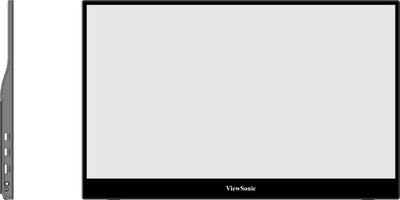 Front View
 -
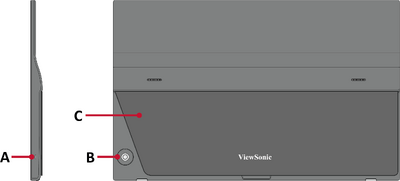 Rear View


| Letter | Item |
|---|---|
| A | Power LED |
| B | Joy Key |
| C | Stand |
I/O Ports

| Number | Item |
|---|---|
| 1 | USB Type C |
| 2 | Mini HDMI |
| 3 | Audio Out |
Further Reading
 |