
MA1014H MA1214H Making Connections: Difference between revisions
From ViewSonic Documentation
No edit summary |
|||
| Line 16: | Line 16: | ||
Before connecting and using the pen display, it is necessary to install the below software. The software can be downloaded at:<br /> | Before connecting and using the pen display, it is necessary to install the below software. The software can be downloaded at:<br /> | ||
https://www.viewsonicglobal.com/q/ | https://www.viewsonicglobal.com/q/MA1014H<br /> | ||
https://www.viewsonicglobal.com/q/ | https://www.viewsonicglobal.com/q/MA1214H | ||
<div class="res-img">[[File:PD1013_PD1013T_Driver_Software.png|200px]]</div> | <div class="res-img">[[File:PD1013_PD1013T_Driver_Software.png|200px]]</div> | ||
Revision as of 08:07, 8 August 2022
Installing Drivers and Software
System Requirements:
Operating system: Windows XP/7/8/10 (32/64 bit)
PC I/O: USB 2.0/above
Before connecting and using the pen display, it is necessary to install the below software. The software can be downloaded at:
https://www.viewsonicglobal.com/q/MA1014H
https://www.viewsonicglobal.com/q/MA1214H

DisplayLink Driver
Open the DisplayLink installation file and install the driver.


- NOTE: DisplayLink Driver can be installed through Windows Update.
Pen Display Driver
Pen Display Manager can be used to map the active area and adjust the feel of the pen.
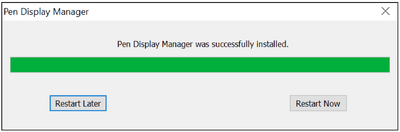
- Open the ViewSign Console installation file and install the driver.
- After the installation completes, you will need to restart the computer.
- NOTE: For further ViewSign Console information, please visit: https://manuals.viewsonic.com/ViewSign_Software

Connecting Device

- Locate the USB cable at the rear of the device.
- Connect the Main USB A cable to the computer. The Secondary USB A cable can be connected to an AC outlet using the supplied power adapter.
- NOTE: When connecting the USB cable directly to the computer, the screen of the tablet may flicker. Please connect the secondary USB A cable to the power adapter and plug the adapter into an AC outlet to ensure that there is enough power.