
VP3481a Introduction: Difference between revisions
From ViewSonic Documentation
No edit summary |
|||
| (4 intermediate revisions by the same user not shown) | |||
| Line 28: | Line 28: | ||
=Front View / Rear View= | =Front View / Rear View= | ||
<gallery widths=350px heights=350px mode="nolines"> | <gallery widths=350px heights=350px mode="nolines"> | ||
VP3481a_Front_View_ID.svg|Front View | |||
VP3481a_Rear_View_ID.svg|Rear View | |||
</gallery> | </gallery> | ||
| Line 41: | Line 41: | ||
|- | |- | ||
|'''B''' | |'''B''' | ||
|Power LED | |||
|- | |||
|'''C''' | |||
|Control Panel Keys | |Control Panel Keys | ||
|- | |- | ||
|''' | |'''D''' | ||
|Power Button | |Power Button | ||
|- | |- | ||
|''' | |'''E''' | ||
|Security Slot | |Security Slot | ||
|} | |} | ||
| Line 52: | Line 55: | ||
=I/O Ports= | =I/O Ports= | ||
<div class="res-img">[[File: | <div class="res-img">[[File:VP3481a_IO.svg| 600px | I/O Ports]]</div> | ||
{| class="wikitable" style="text-align:center; width: 50%;" | {| class="wikitable" style="text-align:center; width: 50%;" | ||
| Line 61: | Line 64: | ||
|'''2''' || HDMI | |'''2''' || HDMI | ||
|- | |- | ||
|'''3''' || DisplayPort | |'''3''' || DisplayPort | ||
|- | |- | ||
|'''4''' || USB Type C | |'''4''' || USB Type C | ||
|- | |- | ||
|'''5 | |'''5''' || USB Type B Port (Upstream) | ||
|- | |- | ||
|''' | |'''6''' || USB Type A Port (Downstream) | ||
|- | |- | ||
|''' | |'''7''' || LAN | ||
|} | |} | ||
<noinclude> | <noinclude> | ||
=Further Reading= | =Further Reading= | ||
{| | {| | ||
|- | |- | ||
|<div class="res-img">[[File: | |<div class="res-img">[[File:library-logo-18.png|600px|link=https://www.viewsonic.com/library/]]</div> | ||
|} | |} | ||
</noinclude> | </noinclude> | ||
[[Category:VP3481a]] | [[Category:VP3481a]] | ||
Latest revision as of 09:25, 3 March 2021
Package Contents
- Monitor
- Power cord
- HDMI cable
- DisplayPort cable
- USB 3.1 Gen. 1 Type C cable
- USB 3.0 up stream cable (Type B to Type A)
- Quick start guide
Front View / Rear View
-
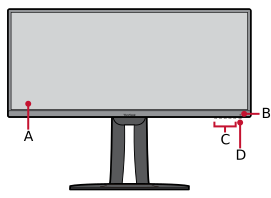 Front View
 -
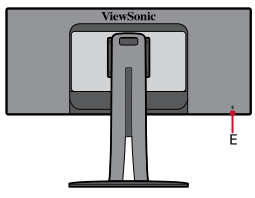 Rear View


| Letter | Item |
|---|---|
| A | Display Screen |
| B | Power LED |
| C | Control Panel Keys |
| D | Power Button |
| E | Security Slot |
I/O Ports

| Number | Item |
|---|---|
| 1 | AC IN |
| 2 | HDMI |
| 3 | DisplayPort |
| 4 | USB Type C |
| 5 | USB Type B Port (Upstream) |
| 6 | USB Type A Port (Downstream) |
| 7 | LAN |
Further Reading
 |