
VA1655 Introduction: Difference between revisions
From ViewSonic Documentation
Created page with "<noinclude> {{Sticky_Menu_Monitor_2.1 |1=VA1655_Introduction |2=VA1655_Initial_Setup |3=VA1655_Connecting_Power_and_Devices |4=VA1655_Adjusting_the_Viewing_Angle |5=VA1655_Qui..." |
No edit summary |
||
| (3 intermediate revisions by the same user not shown) | |||
| Line 20: | Line 20: | ||
<li>USB Type C to Type A cable (optional)</li> | <li>USB Type C to Type A cable (optional)</li> | ||
<li>Mini HDMI to HDMI cable</li> | <li>Mini HDMI to HDMI cable</li> | ||
<li>Quick | <li>Quick start guide</li> | ||
</ol> | </ol> | ||
| Line 54: | Line 54: | ||
|'''1''' || USB Type C | |'''1''' || USB Type C | ||
|- | |- | ||
|'''2''' || | |'''2''' || USB Type C | ||
|- | |- | ||
|'''3''' || | |'''3''' || Mini HDMI | ||
|- | |- | ||
|'''4''' || Audio Out | |||
|} | |} | ||
<noinclude> | <noinclude> | ||
| Line 66: | Line 67: | ||
|} | |} | ||
</noinclude> | </noinclude> | ||
{{#seo: | |||
|title=ViewSonic Monitor | |||
|title_mode=append | |||
|keywords=VA1655, introduction, front view, rear view, I/O | |||
|description=An introduction to the VA1655 monitor. | |||
}} | |||
[[Category:VA1655]] | [[Category:VA1655]] | ||
Latest revision as of 06:02, 27 July 2021
Package Contents
- Portable display
- Power adapter (optional)
- USB Type C cable
- USB Type C to Type A cable (optional)
- Mini HDMI to HDMI cable
- Quick start guide
Front View / Rear View
-
 Front View
 -
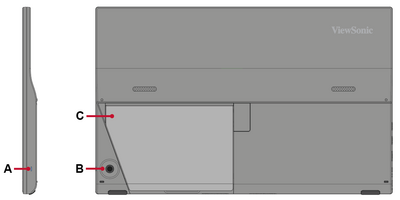 Rear View


| Letter | Item |
|---|---|
| A | Power LED |
| B | Joy Key |
| C | Stand |
I/O Ports

| Number | Item |
|---|---|
| 1 | USB Type C |
| 2 | USB Type C |
| 3 | Mini HDMI |
| 4 | Audio Out |
Further Reading
 |