
X10-4K Operation
From ViewSonic Documentation
Home Screen
The Home Screen is displayed every time you start the projector. To navigate the Home Screen, simply use the directional buttons on the remote control. You can return to the main Home Screen at any time by pressing the Home button on the remote control, regardless of what page you are on.

Aptoide
The projector is pre-loaded with the Aptoide store, which allows users to download and install different Apps.
-
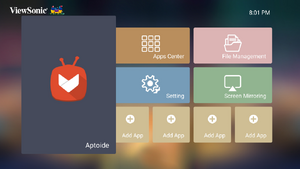 Step 1 - Select Aptoide
 -
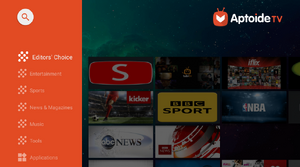 Step 2 - Navigate the store


- Select: Home > Aptoide.
- Use the direction buttons to navigate the menu options. When you find your preferred App, press the OK button to install it.
- NOTE: Users can install third-party Apps by .apk file in File Management. However, some third-party Apps may have compatibility issues.