VA2447-MHU
Package Contents
- Monitor
- Power cord
- Video cable
- Quick start guide
Front View / Rear View
 |
 |
| Letter | Item |
|---|---|
| A | Display Screen |
| B | Control Panel Keys |
| C | Security Slot |
I/O Ports

| Number | Item |
|---|---|
| 1 | AC IN |
| 2 | USB Type C |
| 3 | HDMI |
| 4 | VGA |
| 5 | Audio In |
| 6 | Audio Out |
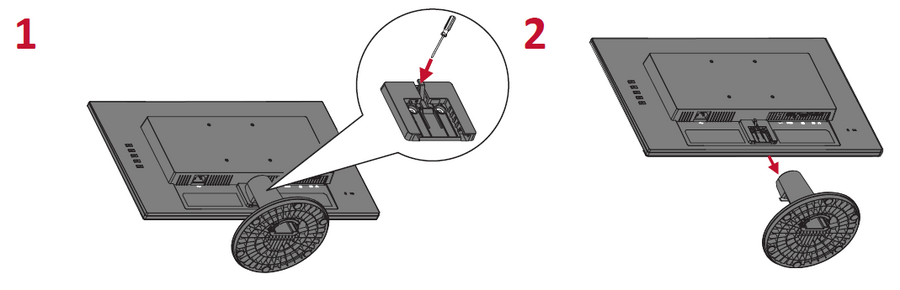
Stand Installation

Wall Mounting
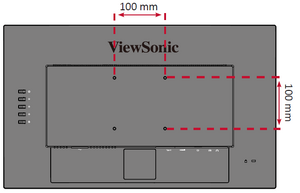
Refer to the table below for the standard dimensions for wall mount kits.
| Maximum Loading | Hole Pattern (W x H) | Interface Pad (W x H x D) | Pad Hole | Screw Specification & Quantity |
|---|---|---|---|---|
| 14 kg | 100 x 100 mm | 115 x 115 x 2.6 mm | Ø 5 mm | M4 x 10 mm - 4 pieces |
- Turn off the device and disconnect all cables.
- Place the device on a flat, stable surface with the scree facing down.
- Remove the stand.
- Attach the mounting bracket to the VESA mounting holes at the rear of the monitor. Then secure it with four (4) screws (M4 x 10 mm).
- Follow the instructions that come with the wall mounting kit to mount the monitor onto the wall.


Connecting to Power
- Connect the power cord to the AC IN jack at the rear of the device.
- Connect the power cord plug to a power outlet.

Connecting External Devices

Tilt Angle Adjustment

Tilt the monitor backwards to the desired viewing angle via the attached stand (-5˚ to 20˚).
- NOTE: When adjusting, support the monitor firmly with one hand while tilting the stand backwards with the other hand.
Using the Control Panel Keys
Use the control panel keys to access the Quick Menu, activate Hot Keys, navigate the On-Screen Display (OSD) Menu, and change the settings.

Quick Menu
Press the 1 key to activate the Quick Menu.

| Icon | Name | Description |
|---|---|---|

|
ViewMode | Select one of the preset color settings. |

|
Volume | Adjust the level, or mute the volume. |

|
Contrast / Brightness | Adjust the contrast or brightness. |

|
Input Select | Select the input source. |

|
Exit | Exit the Quick Menu. |
Hot Keys
When the On-Screen Display (OSD) Menu is off, you can quickly access special functions by using the control panel keys.
| Key | Description |
|---|---|
| 1+2 | Press and hold the keys to lock/unlock the OSD Menu.
When the menu appears on the screen, continue holding both keys for 10 seconds to lock/unlock the OSD Menu.  |
| 2+3 | Press and hold the keys to lock/unlock the Power button.
When the menu appears on the screen, continue holding the key for 10 seconds to lock/unlock the Power button.  |
| 3+4 | Press the keys to display/hide the boot up screen when the device is turned on.
 |
General Operation
- Press the 2/3/4 key to display the On-Screen Display (OSD) Menu.

- Press the 1 or 2 key to select the main menu. Then press the 3 key to enter the selected menu.

- Press the 1 or 2 key to select the desired menu option. Then press the 3 key to enter the sub-menu.

- Press the 1 or 2 key to adjust/select the setting. Then press the 3 key to confirm.

- NOTE: Certain menu option adjustments do not require the user to press the 3 key to confirm the selection. Follow the key guide that appears on the bottom of the screen to select the option or make adjustments.
- Press the 4 key to return to the previous screen.
OSD Tree
Input Select
| Sub-menu | Menu Option | ||
|---|---|---|---|
| D-SUB | |||
| HDMI | |||
| Type C | |||
Audio Adjust
| Sub-menu | Menu Option | |
|---|---|---|
| Volume | On | (-/+, 0~100) |
| Mute | ||
| Audio Input | HDMI (for HDMI input) | |
| Audio In (for D-SUB input) | ||
ViewMode
| Sub-menu | Menu Option | |||
|---|---|---|---|---|
| Standard | ||||
| Game | ||||
| Movie | ||||
| Web | ||||
| Text | ||||
| MAC | ||||
| Mono | ||||
Color Adjust
| Sub-menu | Menu Option | ||
|---|---|---|---|
| Contrast/Brightness | Contrast | (-/+, 0~100) | |
| Brightness | (-/+, 0~100) | ||
| Color Temperature | Bluish | ||
| Cool | |||
| Native | |||
| Warm | |||
| User Color | Red | (-/+, 0~100) | |
| Green | (-/+, 0~100) | ||
| Blue | (-/+, 0~100) | ||
| Color Space (for HDMI only) |
Auto | ||
| RGB | |||
| YUV | |||
| Color Range (for HDMI only) |
Auto | ||
| Full Range | |||
| Limited Range | |||
Manual Image Adjust
| Sub-menu | Menu Option | |
|---|---|---|
| Auto Image Adjust (for D-Sub only) |
||
| Horizontal Size (for D-Sub only) |
(-/+, 0~100) | |
| H./V. Position (for D-Sub only) |
Horizontal Position | (-/+, 0~100) |
| Vertical Position | (-/+, 0~100) | |
| Fine Tune (for D-Sub only) |
(-/+, 0~100) | |
| Sharpness | (-/+, 0/25/50/75/100) | |
| Blue Light Filter | (-/+, 0~100) | |
| Aspect Ratio | 4:3 | |
| 5:4 | ||
| 16:9 | ||
| 16:10 | ||
| Overscan (for HDMI only) |
On | |
| Off | ||
| Black Stabilization | (-/+, 0/10/20/30/40/50/60/70/80/90/100) | |
| Advanced DCR | (-/+, 0/25/50/75/100) | |
| Response Time | Standard | |
| Advanced | ||
| Ultra Fast | ||
Setup Menu
| Sub-menu | Menu Option |
|---|---|
| Language Select | English |
| Français | |
| Deutsch | |
| Español | |
| Italiano | |
| Suomi | |
| Svenska | |
| Русский | |
| Türkçe | |
| Česká | |
| 日本語 | |
| 한국어 | |
| 繁體中文 | |
| 简体中文 | |
| FreeSync | On |
| Off | |
| Resolution Notice | On |
| Off | |
| Information | |
| OSD Time Out | (-/+, 5/15/30/60) |
| OSD Background | On |
| Off | |
| Power Indicator | On |
| Off | |
| Auto Power Off | On |
| Off | |
| USB Charging | Always On |
| Off | |
| Sleep | 30 minutes |
| 45 minutes | |
| 60 minutes | |
| 120 minutes | |
| Off | |
| ECO Mode | Standard |
| Optimize | |
| Conserve | |
| Energy Saving[1] | On |
| Off | |
| Power Button | Power Off |
| Screen Off | |
| Auto Detect | On |
| Off | |
| DDC/CI | On |
| Off | |
| Memory Recall |
- ↑ When Energy Saving is On, Auto Power Off, ViewMode, Black Stabilization, and Advanced DCR will be disabled.
Technical Specifications

| Model No. | P/N |
|---|---|
| VS18764 | VA2447-mhu |
| Item | Category | Specifications |
|---|---|---|
| LCD | Type | Color a-Si, TFT Active Matrix 1920 x 1080 LCD;
0.2745 mm (H) x 0.2745 mm (V) pixel pitch |
| Display Size | 60 cm, 24" (23.8" viewable) | |
| Color Filter | RGB vertical stripe | |
| Glass Surface | Anti-Glare (Haze 25%), Hard Coating (3H) | |
| Input Signal | Video Sync | Analog
TMDS digital (100 Ω)
|
| Compatibility | PC | up to 1920 x 1080 |
| Macintosh | up to 1920 x 1080 | |
| Recommended | 1920 x 1080 @ 60Hz | |
| Resolution[1] | Supported |
|
| Power Adapter[2] | Input Voltage | AC 100-240V, 50/60Hz (auto switch) |
| Display Area | Full Scan
(H x V) |
527.04 x 296.46 mm
(20.75” x 11.67”) |
| Operating Conditons | Temperature | 0° C to 40° C (32° F to 104° F) |
| Humidity | 20% to 90% (non-condensing) | |
| Altitude | 16,404 feet (4.9 km) | |
| Storage Conditions | Temperature | -20° C to 60° C (-4° F to 140° F) |
| Humidity | 5% to 90% (non-condensing) | |
| Altitude | 40, 000 feet (12.1 km) | |
| Physical Dimensions | (W x H x D) | 539.5 x 402.7 x 205.5 mm (21.2” x 15.9” x 8.1”) |
| Wall Mount | Dimensions | 100 x 100 mm |
| Weight | Physical | 3.3 kg (6.3 lbs) |
| Power Saving Modes | On[3] | 21W without audio (Typical) 23W with 50% audio (Typical) |
| Off | < 0.3W (Max) |
Compliance Information
This section addresses all connected requirements and statements regarding regulations. Confirmed corresponding applications shall refer to nameplate labels and relevant markings on the unit.
FCC Compliance Statement
This device complies with part 15 of FCC Rules. Operation is subject to the following two conditions: (1) this device may not cause harmful interference, and (2) this device must accept any interference received, including interference that may cause undesired operation. This equipment has been tested and found to comply with the limits for a Class B digital device, pursuant to part 15 of the FCC Rules.
These limits are designed to provide reasonable protection against harmful interference in a residential installation. This equipment generates, uses, and can radiate radio frequency energy, and if not installed and used in accordance with the instructions, may cause harmful interference to radio communications. However, there is no guarantee that interference will not occur in a particular installation. If this equipment does cause harmful interference to radio or television reception, which can be determined by turning the equipment off and on, the user is encouraged to try to correct the interference by one or more of the following measures:
- Reorient or relocate the receiving antenna.
- Increase the separation between the equipment and receiver.
- Connect the equipment into an outlet on a circuit different from that to which the receiver is connected.
- Consult the dealer or an experienced radio/TV technician for help.
Industry Canada Statement
CAN ICES-003(B)/NMB-003(B)
The following information is only for EU-member states

The mark shown to the right is in compliance with the Waste Electrical and Electronic Equipment Directive 2012/19/EU (WEEE). The mark indicates the requirement NOT to dispose of the equipment as unsorted municipal waste, but use the return and collection systems according to local law.
Declaration of RoHS2 Compliance
This product has been designed and manufactured in compliance with Directive 2011/65/EU of the European Parliament and the Council on restriction of the use of certain hazardous substances in electrical and electronic equipment (RoHS2 Directive) and is deemed to comply with the maximum concentration values issued by the European Technical Adaptation Committee (TAC) as shown below:
| Substance | Proposed Maximum Concentration | Actual Concentration |
|---|---|---|
| Lead (Pb) | 0.1% | < 0.1% |
| Mercury (Hg) | 0.1% | < 0.1% |
| Cadmium (Cd) | 0.01% | < 0.01% |
| Hexavalent Chromium (Cr6⁺) | 0.1% | < 0.1% |
| Polybrominated biphenyls (PBB) | 0.1% | < 0.1% |
| Polybrominated diphenyl ethers (PBDE) | 0.1% | < 0.1% |
| Bis(2-ethylhexyl) phthalate (DEHP) | 0.1% | < 0.1% |
| Butyl benzyl phthalate (BBP) | 0.1% | < 0.1% |
| Dibutyl phthalate (DBP) | 0.1% | < 0.1% |
| Diisobutyl phthalate (DIBP) | 0.1% | < 0.1% |
Certain components of products as stated above are exempted under the Annex III of the RoHS2 Directives as noted below. Examples of exempted components are:
- Lead as an alloying element in aluminum containing up to 0.4% lead by weight.
- Copper alloy containing up to 4% lead by weight.
- Lead in high melting temperature type solders (i.e. lead-based alloys containing 85% by weight or more lead).
- Electrical and electronic components containing lead in a glass or ceramic other than dielectric ceramic in capacitors, e.g. piezoelectronic devices, or in a glass or ceramic matrix compound.
Indian Restriction of Hazardous Substances
Restriction on Hazardous Substances statement (India). This product complies with the “India E-waste Rule 2011” and prohibits use of lead, mercury, hexavalent chromium, polybrominated biphenyls or polybrominated diphenyl ethers in concentrations exceeding 0.1 weight % and 0.01 weight % for cadmium, except for the exemptions set in Schedule 2 of the Rule.
Product Disposal at End of Product Life
ViewSonic® respects the environment and is committed to working and living green. Thank you for being part of Smarter, Greener Computing. Please visit the ViewSonic® website to learn more.
USA & Canada
https://www.viewsonic.com/us/company/green/go-green-with-viewsonic/#recycle-program
Europe
http://www.viewsoniceurope.com/eu/support/call-desk/
Taiwan
https://recycle.epa.gov.tw/
Copyright Information
Copyright© ViewSonic® Corporation, 2021. All rights reserved.
Macintosh and Power Macintosh are registered trademarks of Apple Inc.
Microsoft, Windows, and the Windows logo are registered trademarks of Microsoft Corporation in the United States and other countries.
ViewSonic®, the three birds logo, OnView, ViewMatch, and ViewMeter are registered trademarks of ViewSonic® Corporation.
VESA is a registered trademark of the Video Electronics Standards Association. DPMS, DisplayPort, and DDC are trademarks of VESA.
ENERGY STAR® is a registered trademark of the U.S. Environmental Protection Agency (EPA).
As an ENERGY STAR® partner, ViewSonic® Corporation has determined that this product meets the ENERGY STAR® guidelines for energy efficiency.
Disclaimer: ViewSonic® Corporation shall not be liable for technical or editorial errors or omissions contained herein; nor for incidental or consequential damages resulting from furnishing this material, or the performance or use of this product.
In the interest of continuing product improvement, ViewSonic® Corporation reserves the right to change product specifications without notice. Information in this document may change without notice.
No part of this document may be copied, reproduced, or transmitted by any means, for any purpose without prior written permission from ViewSonic® Corporation.
VA2447-mhu_UG_ENG_1a_2021-05-18