


| Sub-menu |
|---|
| HDMI |
| Type C |
VA1655-3
From ViewSonic Documentation
Introduction
Package Contents
- Portable display
- Power adapter (optional)
- USB Type C cable
- USB Type C to Type A cable (optional)
- Mini HDMI to HDMI cable
- Quick start guide
Note: The cables included in your package may vary depending on your country. Please contact your local reseller for more information.
Product Overview
-
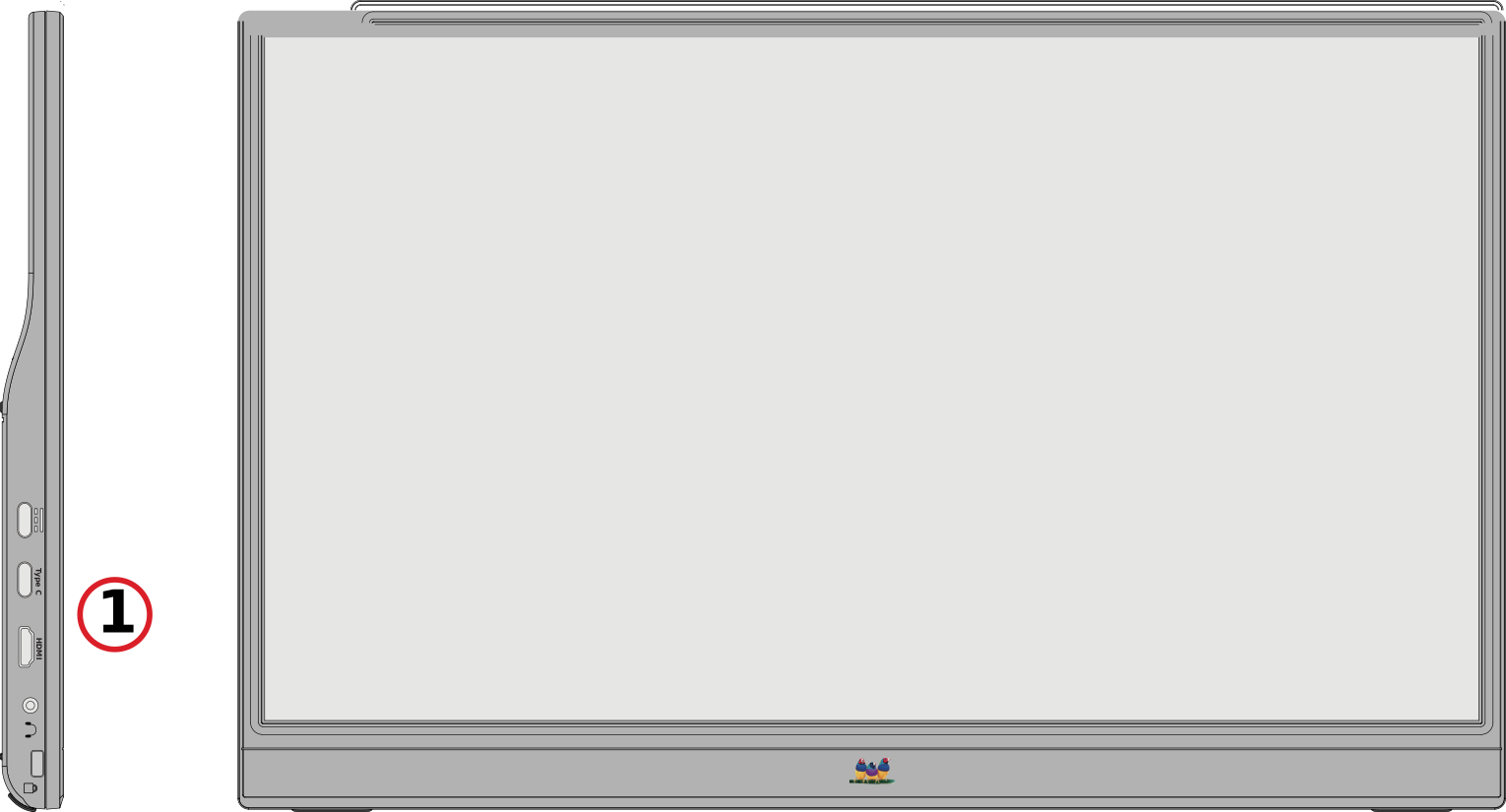 Front View
 -
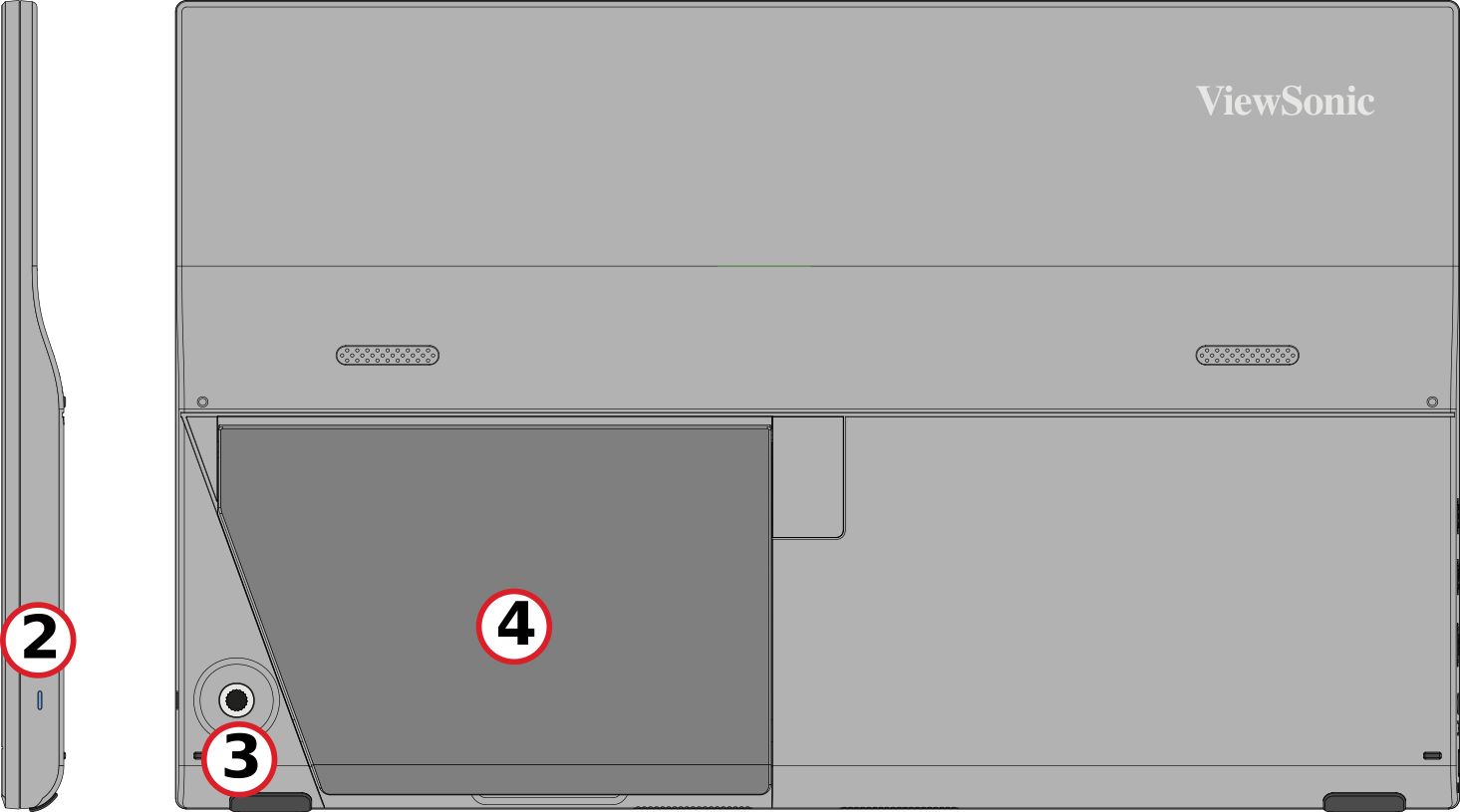 Rear View
| Number | Description |
|---|---|
| 1 | I/O Ports |
| 2 | Power LED |
| 3 | Joy Key |
| 4 | Stand |
I/O Ports

| Number | Description |
|---|---|
| 1 | USB Type C |
| 2 | USB Type C |
| 3 | Mini HDMI |
| 4 | Audio Out |
Note: For more information about the Joy Key, refer to Using the Joy Key.
Initial Setup
Tilt Angle Adjustment
Tilt the monitor backwards to the desired viewing angle by using the attached stand (30˚ to 53˚).

Note: When adjusting, support the monitor firmly with one hand while tilting the stand backwards with the other hand.
Using the Stand

Note: Place the monitor on a flat, stable surface to ensure safety and optimal performance.
Making Connections
Connecting to Power
The monitor can be powered in any of the following configurations:

Connecting to External Devices
Your external device(s) can be connected in any of the following configurations:
Type C Connection
Connect a Type C cable from your external device to a Type C port on the monitor.

Mini HDMI Connection
- Connect the mini HDMI cable from your external device to the mini HDMI port on the monitor.
- Connect the USB Type A to Type C cable from your external device.

Note: The USB Type A to Type C connection will also supply power to the monitor from the laptop. The power output must be greater than 10W.
Power Delivery
Powering a Laptop or Mobile Phone
If the included power adapter is connected to the monitor, then the monitor can charge a connected laptop or mobile phone.
Note: Power Delivery Output: DC 5V/9V/12V/15V/20V/Max 3A.

Power Supply Detection
This product will detect if the power supply device is an adapter, laptop or mobile phone.
- If the power source is an adapter or laptop, the default brightness value will be 100.
- If the power source is a mobile phone, the default brightness value will be 15.
- When using a mobile phone to power the monitor, the default brightness level will be 15.
Note: Due to the limited power output of the mobile phone, do not adjust the brightness level higher as this may cause the display to flash or shut down.
Power Delivery - Further Information
Due to the VA1655-3’s design please note:
- The first connected device will be the main input signal.
- When a Type C port recognizes an external device as a power adapter, it will only distribute the power. It will NOT display the input signal.
- Only when one of the Type C ports is recognized as a power adapter can the other one deliver two-way power.
If a laptop is connected first to the VA1655-3, then a mobile phone is connected second, the mobile phone’s battery will not be charged as neither Type C port recognizes the connection as being connected to a power adapter.
Note: If you want to display the mobile phone’s screen, you must unplug the Type C cable connected to the laptop.
If a mobile phone is connected first to the VA1655-3, then a laptop is connected second, the mobile phone’s battery will be charged as one of the Type C ports is recognized as being connected to a power adapter.
Note: If you want to display the laptop screen, you must unplug the Type C cable connected to the mobile phone.
Due to the VA1655-3’s design, do not connect two laptops or one laptop and a desktop computer at the same time. This can cause power distribution conflicts, resulting in flashing screens or the forced shutdown of the laptop(s).
Note:
- If the laptop has a Type C port, please connect via Type C to the VA1655-3.
- Do not connect the other Type C port of the VA1655-3 to another laptop or desktop computer via Type A and HDMI at the same time.
- If the laptop only has HDMI and Type A ports, please connect via HDMI and Type A to Type C to the VA1655-3.
- If the power output of the Type A port of the laptop is not greater than 10W, please use our power adapter to connect to the VA1655.
- Do not connect the other Type C port of the VA1655 to another laptop or desktop computer at the same time.
Using the Monitor
Turning the Monitor On/Off

- Connect to a power source in one of the available configurations. For more information please see Connecting to Power.
- Press the Power ( ) button to turn on the monitor.
- To turn the monitor off, press the Power ( ) button again.
Note: The monitor will still consume power as long as the power cord is plugged in. If the monitor is not being used for extended periods, please unplug the power cord from the power outlet.
Using the Joy
Activate Hot Keys, navigate the On-Screen Display (OSD) Menu, and change settings.

Quick Menu
Move the Joy Key (  /
/ /
/ /
/ ) to activate the Quick Menu.

Note: Follow the key guide that appears on the screen to select the option or make adjustments.
| Icon | Menu | Description |
|---|---|---|

|
ViewMode | Select one of the preset color settings. |

|
Contrast/Brightness | Adjust the contrast or brightness level. |

|
Input Select | Select the input source. |

|
Main Menu | Enter the On-Screen Display (OSD) Menu. |

|
Exit | Exit the Quick Menu. |
Configuring the Settings
General Operations
- Press the Joy Key (
 ) to display the OSD Menu.
 - Move the Joy Key ( ) or ( ) to select the main menu. Then press the Joy Key ( ) to enter the selected menu.
- Move the Joy Key ( ) or ( ) to select the desired menu option. Then press the Joy Key ( ) to enter the sub-menu.
- Move the Joy Key ( ) or ( ) to adjust/select the setting. Then press the Joy Key ( ) to confirm. Or move the Joy Key ( ) or ( ) to make adjustments.
- Follow the key guide to return to the previous screen.


Note: Certain menu option adjustments do not require the user to press the Joy Key ( ) to confirm the selection. Follow the key guide to select the option or make adjustments.
) to confirm the selection. Follow the key guide to select the option or make adjustments.Appendix
Specifications
| Item | Category | Specifications |
|---|---|---|
| ID | Model No. | VS18172 |
| P/N | VA1655-3 | |
| LCD | Type | TFT Active Matrix 1920 x 1080 LCD;
0.17925 (H) mm x 0.17925 (V) mm pixel pitch |
| Display Size | 39.6 cm | |
| 16" (15.6" viewable) | ||
| Color Filter | RGB Vertical Stripe | |
| Glass Surface | Anti-Glare (Haze 25%), Hard Coating (3H) | |
| Input Signal | Video Sync | TMDS digital (100 Ω)
Micro-Packet
|
| Compatibility | PC | up to 1920 x 1080 |
| Macintosh | up to 1920 x 1080 | |
| Resolution and Timings[1] | Recommended | 1920 x 1080 @ 60 Hz |
| Supported |
| |
| Power Adapter[2](optional) | Input Voltage | AC 100-240V, 50/60 Hz (auto switch) |
| UE Electronic | UES60LCP-200300SPC | |
| Display Area | Active Size (H x V) |
344.16 x 193.59 mm |
| 13.55” x 7.62” | ||
| Operating Conditons | Altitude | 3 km |
| 9,842.5 ft | ||
| Relative Humidity | 20% to 90% (non-condensing) | |
| Temperature | 0° C to 40° C | |
| 32° F to 104° F | ||
| Storage Conditions | Altitude | 12.1 km |
| 40,000 ft | ||
| Relative Humidity | 5% to 90% (non-condensing) | |
| Temperature | -20° C to 60° C | |
| -4° F to 140° F | ||
| Dimensions | Physical (W x H x D) |
359.3 x 227 x 17.4 mm |
| 14.1” x 8.9” x 0.7” | ||
| Weight | Physical | 0.8 kg |
| 1.8 lb | ||
| Power Consumption | On[3] | 7W (Typical) |
| Off | < 0.3W (Maximum) |
On-Screen Display (OSD) Menu Tree
| Sub-menu | Menu Option |
|---|---|
| Volume | (-/+, 0~100)/1 |
| Mute | On |
| Off |
| Sub-menu | Menu Option | |||
|---|---|---|---|---|
| Off | ||||
| Office | Web | |||
| Text | ||||
| Custom 1/2/3 | Low Input Lag | On | ||
| Off | ||||
| Black Stabilization | (-/+, 0~100)/10 | |||
| Advanced DCR | (-/+, 0~100)/25 | |||
| Response Time | Standard | |||
| Advanced | ||||
| Ultra Fast | ||||
| Hue | Red | (-/+, 0~100)/1 | ||
| Green | (-/+, 0~100) | |||
| Blue | (-/+, 0~100) | |||
| Cyan | (-/+, 0~100) | |||
| Magenta | (-/+, 0~100) | |||
| Yellow | (-/+, 0~100) | |||
| Saturation | Red | (-/+, 0~100)/1 | ||
| Green | (-/+, 0~100) | |||
| Blue | (-/+, 0~100) | |||
| Cyan | (-/+, 0~100) | |||
| Magenta | (-/+, 0~100) | |||
| Yellow | (-/+, 0~100) | |||
| Rename | ||||
| Recall | ||||
| Movie | ||||
| MAC | ||||
| Mono | ||||
| Game | FPS 1 | |||
| FPS 2 | ||||
| RTS | ||||
| MOBA | ||||
| Sub-menu | Menu Option | ||
|---|---|---|---|
| Contrast/Brightness | Contrast | (-/+, 0~100)/1 | |
| Brightness | (-/+, 0~100)/1 | ||
| Color Temperature | sRGB | ||
| Bluish | |||
| Cool | |||
| Native | |||
| Warm | |||
| User Color | Red | (-/+, 0~100)/1 | |
| Green | (-/+, 0~100)/1 | ||
| Blue | (-/+, 0~100)/1 | ||
| Color Space | Auto | ||
| RGB | |||
| YUV | |||
| Color Range | Auto | ||
| Full Range | |||
| Limited Range | |||
| Gamma | 1.8 | ||
| 2.0 | |||
| 2.2 | |||
| 2.4 | |||
| 2.6 | |||
| 2.8 | |||
| Sub-menu | Menu Option |
|---|---|
| Sharpness | (-/+, 0~100)/25 |
| Aspect Ratio | 4:3 |
| Full Screen | |
| Overscan | On |
| Off | |
| Blue Light Filter | (-/+, 0~100)/1 |
| Sub-menu | Menu Option |
|---|---|
| Language | English |
| Français | |
| Deutsch | |
| Español | |
| Italiano | |
| Suomi | |
| Svenska | |
| Русский | |
| Türkçe | |
| Česká | |
| Tiếng Việt | |
| 日本語 | |
| 한국어 | |
| 繁體中文 | |
| 简体中文 | |
| Resolution Notice | On |
| Off | |
| Information | |
| OSD Timeout | (-/+, 5/15/30/60) |
| OSD Background | On |
| Off | |
| OSD Pivot | 0° |
| 90° | |
| Power Indicator | On |
| Off | |
| Auto Power Off | On |
| Off | |
| Sleep | 30 minutes |
| 45 minutes | |
| 60 minutes | |
| 120 minutes | |
| Off | |
| ECO Mode | Standard |
| Optimize | |
| Conserve | |
| Auto Detect | On |
| Off | |
| DDC/CI | On |
| Off | |
| Memory Recall |
VA1655-3_UG_ENG_1a_20240613