PD0521
Package Contents
 |
 |
 |
 |
| PD0521 Signature Pad | USB 2.0, (Type A to Micro USB) |
Pen | Replacement Pen nib x 3 |
 |
 |
 |
|
| Pen Tether | Nib removal tool | Quick Start Guide | |
Front View / Rear View
 |
 |
| Number | Item |
|---|---|
| 1 | Pen Holder |
| 2 | Display Screen |
| 3 | Security Lock Slot |
| 4 | Micro USB Port |
| 5 | Wall Mounting Slots |
| 6 | Pen |
| 7 | Pen Tether Anchor Point |
Installing Drivers and Software
System Requirements
Operating system: Windows 7, 10, 11, or later; Linux Ubuntu; Chrome OS by request.
PC I/O: USB 2.0/above
ViewSign Standard software is the recommended software to use with PD0521 for PDF signing.

To learn more about the ViewSign Standard software, please see: ViewSign Software.
- NOTE: If you want to use the full version of the ViewSign Standard Software, please contact our local agent or sales window directly.
Connecting the Signature Pad
- Turn the device over so the bottom side is facing up.
- Connect the Micro USB end of the USB cable to the Micro USB Port on the device.
- Connect the other end of the USB cable to a computer.


Using the Pen Tether
The Pen Tether can be attached to the Pen and to the available anchor point.

Setting the Display Area
After the pen display is connected to the computer, the Display settings will need to be adjusted. To access your computer’s Display settings:
- Go to: Start > Settings > System > Display, or
- Right Click on the Desktop and select Display settings.

Once inside the Display settings, ensure the pen display is selected and:
- Display orientation is set to Landscape or Portrait (depending on your preference), and
- Multiple displays is set to Extend these displays.

- NOTE: Changing from anything but Landscape mode also requires a change in the Pen Display Driver settings (in ViewSign Console).
Pen Input Area Mapping
To set the proper pen input area:
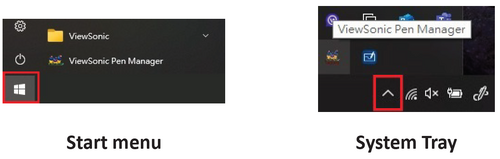
- Open ViewSonic Pen Manager either from the Start menu, by going to: Start > ViewSonic Pen Manager, or by selecting the ViewSonic Pen Manager icon from the System Tray.
- Select the Mapping tab.

- Select the correct Orientation (Landscape), and Monitor.

- Further adjustments can be made by selecting the Pen tab.


Technical Specifications

| Model No. | P/N |
|---|---|
| VS17546 | PD0521 |
Display
| Item | Category | Specifications |
|---|---|---|
| LCD | Type | 800 x 480 LCD, 0.135 mm x 0.135 mm pixel pitch |
| Surface Treatment | Anti-Glare, Hard-Coating (8H) | |
| Resolution | Supported | 800 x 480 (16:10) |
| Power | USB | USB 2.0: 5V/0.5A Max |
| Display Area | Full Scan (H x V) | 108 x 64.8 mm (4.25” x 2.55”) |
| Operating Conditions | Temperature | 0° C to 50° C (32° F to 122° F) |
| Humidity | 20% to 80% (non-condensing) | |
| Storage Conditions | Temperature | -20° C to 60° C (-4° F to 140° F) |
| Humidity | 10% to 90% (non-condensing) | |
| Dimensions | Physical (W x D x H) |
160 x 130 x 21.4 mm (6.3" x 5.12" x 0.84") |
| Weight | Physical | 0.494 kg (1.09 lbs) |
| Power Consumption | On | 2.06W (Typical) |
| Standby | ≤ 1W |
Pen
| Item | Specifications |
|---|---|
| Model | EMP-001 |
| Type | Electromagnetic resonance |
| Power Supply | Battery-less |
| Resolution | 5080 LPI (lines per inch) |
| Pressure Levels | 2048 |
| Report Rate | Average 200 PPS (points per second) |
| Pen Tilt Angle | +/- 45° |
| OS Supported | Windows 10, 11, or later.
(Win 7, Linux Ubuntu, Chrome OS by request) |
Compliance Information
This section addresses all connected requirements and statements regarding regulations. Confirmed corresponding applications shall refer to nameplate labels and relevant markings on the unit.
FCC Compliance Statement
This device complies with part 15 of FCC Rules. Operation is subject to the following two conditions: (1) this device may not cause harmful interference, and (2) this device must accept any interference received, including interference that may cause undesired operation. This equipment has been tested and found to comply with the limits for a Class B digital device, pursuant to part 15 of the FCC Rules.
These limits are designed to provide reasonable protection against harmful interference in a residential installation. This equipment generates, uses, and can radiate radio frequency energy, and if not installed and used in accordance with the instructions, may cause harmful interference to radio communications. However, there is no guarantee that interference will not occur in a particular installation. If this equipment does cause harmful interference to radio or television reception, which can be determined by turning the equipment off and on, the user is encouraged to try to correct the interference by one or more of the following measures:
- Reorient or relocate the receiving antenna.
- Increase the separation between the equipment and receiver.
- Connect the equipment into an outlet on a circuit different from that to which the receiver is connected.
- Consult the dealer or an experienced radio/TV technician for help.
Industry Canada Statement
CAN ICES-003(B) / NMB-003(B)
CE Conformity for European Countries

The device complies with the EMC Directive 2014/30/EU and Low Voltage Directive 2014/35/EU.
The following information is only for EU-member states:

The mark shown to the right is in compliance with the Waste Electrical and Electronic Equipment Directive 2012/19/EU (WEEE). The mark indicates the requirement NOT to dispose of the equipment as unsorted municipal waste, but use the return and collection systems according to local law.
Declaration of RoHS2 Compliance
This product has been designed and manufactured in compliance with Directive 2011/65/EU of the European Parliament and the Council on restriction of the use of certain hazardous substances in electrical and electronic equipment (RoHS2 Directive) and is deemed to comply with the maximum concentration values issued by the European Technical Adaptation Committee (TAC) as shown below:
| Substance | Proposed Maximum Concentration | Actual Concentration |
|---|---|---|
| Lead (Pb) | 0.1% | < 0.1% |
| Mercury (Hg) | 0.1% | < 0.1% |
| Cadmium (Cd) | 0.01% | < 0.01% |
| Hexavalent Chromium (Cr6⁺) | 0.1% | < 0.1% |
| Polybrominated biphenyls (PBB) | 0.1% | < 0.1% |
| Polybrominated diphenyl ethers (PBDE) | 0.1% | < 0.1% |
| Bis (2-ethylhexyl) phthalate (DEHP) | 0.1% | < 0.1% |
| Butyl benzyl phthalate (BBP) | 0.1% | < 0.1% |
| Dibutyl phthalate (DBP) | 0.1% | < 0.1% |
| Diisobutyl phthalate (DIBP) | 0.1% | < 0.1% |
Certain components of products as stated above are exempted under the Annex III of the RoHS2 Directives as noted below. Examples of exempted components are:
- Mercury in cold cathode fluorescent lamps and external electrode fluorescent lamps (CCFL and EEFL) for special purposes not exceeding (per lamp):
- Short length (500 mm): maximum 3.5 mg per lamp.
- Medium length (> 500 mm and 1,500 mm): maximum 5 mg per lamp.
- Long length (> 1,500 mm): maximum 13 mg per lamp.
- Lead in glass of cathode ray tubes.
- Lead in glass of fluorescent tubes not exceeding 0.2% by weight.
- Lead as an alloying element in aluminum containing up to 0.4% lead by weight.
- Copper alloy containing up to 4% lead by weight.
- Lead in high melting temperature type solders (i.e. lead-based alloys containing 85% by weight or more lead).
- Electrical and electronic components containing lead in a glass or ceramic other than dielectric ceramic in capacitors, e.g. piezoelectronic devices, or in a glass or ceramic matrix compound.
Indian Restriction of Hazardous Substances
Restriction on Hazardous Substances statement (India). This product complies with the “India E-waste Rule 2011” and prohibits use of lead, mercury, hexavalent chromium, polybrominated biphenyls or polybrominated diphenyl ethers in concentrations exceeding 0.1 weight % and 0.01 weight % for cadmium, except for the exemptions set in Schedule 2 of the Rule.
Product Disposal at End of Product Life
ViewSonic® respects the environment and is committed to working and living green. Thank you for being part of Smarter, Greener Computing. Please visit the ViewSonic® website to learn more.
USA & Canada
https://www.viewsonic.com/us/company/green/go-green-with-viewsonic/#recycle-program
Europe
http://www.viewsoniceurope.com/eu/support/call-desk/
Taiwan
https://recycle.epa.gov.tw/
Copyright Information
Copyright© ViewSonic® Corporation, 2021. All rights reserved.
Macintosh and Power Macintosh are registered trademarks of Apple Inc.
Microsoft, Windows, and the Windows logo are registered trademarks of Microsoft Corporation in the United States and other countries.
ViewSonic®, the three birds logo, OnView, ViewMatch, and ViewMeter are registered trademarks of ViewSonic® Corporation.
VESA is a registered trademark of the Video Electronics Standards Association. DPMS, DisplayPort, and DDC are trademarks of VESA.
ENERGY STAR® is a registered trademark of the U.S. Environmental Protection Agency (EPA).
Disclaimer: ViewSonic® Corporation shall not be liable for technical or editorial errors or omissions contained herein; nor for incidental or consequential damages resulting from furnishing this material, or the performance or use of this product.
In the interest of continuing product improvement, ViewSonic® Corporation reserves the right to change product specifications without notice. Information in this document may change without notice.
No part of this document may be copied, reproduced, or transmitted by any means, for any purpose without prior written permission from ViewSonic® Corporation.
PD0511_UG_ENG_Rev. 1A_2021-04-21