
LS901HD LS901-4K Choosing Location: Difference between revisions
From ViewSonic Documentation
// via Wikitext Extension for VSCode |
// via Wikitext Extension for VSCode |
||
| Line 1: | Line 1: | ||
==Choosing a Location - Projector Orientation== | ==<translate>Choosing a Location - Projector Orientation</translate>== | ||
Personal preference and room layout will decide the installation location. Consider the following: | <translate>Personal preference and room layout will decide the installation location. Consider the following: | ||
* Size and position of your screen. | * Size and position of your screen. | ||
* Location of a suitable power outlet. | * Location of a suitable power outlet. | ||
* Location and distance between the projector and other equipment. | * Location and distance between the projector and other equipment. | ||
The projector is designed to be installed in one of the following locations: | The projector is designed to be installed in one of the following locations:</translate> | ||
<gallery mode="packed" style="text-align:left;"> | <gallery mode="packed" style="text-align:left;"> | ||
LS710HD_LS751HD_Front_Table.JPG| <div style="font-style: normal;">'''Front'''<br>The projector is placed near the floor in front of the screen.</div> | LS710HD_LS751HD_Front_Table.JPG| <div style="font-style: normal;"><translate>'''Front'''</translate><br><translate>The projector is placed near the floor in front of the screen.</translate></div> | ||
LS710HD_LS751HD_Front_Ceiling.JPG| <div style="font-style: normal;">'''Front Ceiling'''<br>The projector is suspended upside-down from the ceiling in front of the screen.</div> | LS710HD_LS751HD_Front_Ceiling.JPG| <div style="font-style: normal;"><translate>'''Front Ceiling'''</translate><br><translate>The projector is suspended upside-down from the ceiling in front of the screen.</translate></div> | ||
LS710HD_LS751HD_Rear_Table.JPG| <div style="font-style: normal;">'''Rear'''<ref name="id">A rear projection screen is required.</ref><br>The projector is placed near the floor behind the screen.</div> | LS710HD_LS751HD_Rear_Table.JPG| <div style="font-style: normal;"><translate>'''Rear'''</translate><ref name="id"><translate>A rear projection screen is required.</translate></ref><br><translate>The projector is placed near the floor behind the screen.</translate></div> | ||
LS710HD_LS751HD_Rear_Top.JPG| <div style="font-style: normal;">'''Rear Ceiling'''<ref name="id" /><br>The projector is suspended upside-down from the ceiling behind the screen.</div> | LS710HD_LS751HD_Rear_Top.JPG| <div style="font-style: normal;"><translate>'''Rear Ceiling'''</translate><ref name="id" /><br><translate>The projector is suspended upside-down from the ceiling behind the screen.</translate></div> | ||
</gallery> | </gallery> | ||
'''Notes:''' | <translate>'''Notes:'''</translate> | ||
<references /> | <references /> | ||
Revision as of 06:53, 5 November 2024
Choosing a Location - Projector Orientation
Personal preference and room layout will decide the installation location. Consider the following:
- Size and position of your screen.
- Location of a suitable power outlet.
- Location and distance between the projector and other equipment.
The projector is designed to be installed in one of the following locations:
-
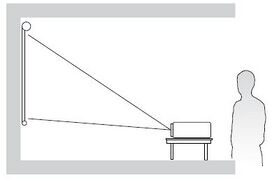 Front
Front
The projector is placed near the floor in front of the screen. -
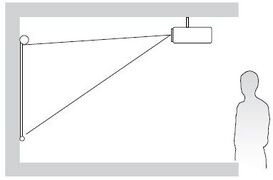 Front Ceiling
The projector is suspended upside-down from the ceiling in front of the screen. -
![Rear[1] The projector is placed near the floor behind the screen.](/images/thumb/5/5d/LS710HD_LS751HD_Rear_Table.JPG/271px-LS710HD_LS751HD_Rear_Table.JPG) Rear[1]
Rear[1]
The projector is placed near the floor behind the screen. -
![Rear Ceiling[1] The projector is suspended upside-down from the ceiling behind the screen.](/images/thumb/2/22/LS710HD_LS751HD_Rear_Top.JPG/267px-LS710HD_LS751HD_Rear_Top.JPG) Rear Ceiling[1]
Rear Ceiling[1]
The projector is suspended upside-down from the ceiling behind the screen.


![Rear[1] The projector is placed near the floor behind the screen.](/File:LS710HD_LS751HD_Rear_Table.JPG)
![Rear Ceiling[1] The projector is suspended upside-down from the ceiling behind the screen.](/File:LS710HD_LS751HD_Rear_Top.JPG)
Notes: