
Monitor Safety Precautions SU: Difference between revisions
From ViewSonic Documentation
No edit summary |
No edit summary |
||
| Line 2: | Line 2: | ||
=Using the Monitor Safely= | =Using the Monitor Safely= | ||
Please read these instructions completely before using the equipment. | Please read these instructions completely before using the equipment. | ||
* Keep | * Keep this user guide in a safe place for later reference. | ||
* | * Read all warnings and follow all instructions. | ||
* Sit at least | * Sit at least 18" (45 cm) away from the device. | ||
* | * Allow at least 4" (10 cm) clearance around the device to ensure proper ventilation. | ||
* | * Place the device in a well-ventilated area. Do not place anything on the device that prevents heat dissipation. | ||
* Do not use the device near water. To reduce the risk of fire or electric shock, do not expose the device to moisture. | |||
* Avoid exposing the device to direct sunlight or other sources of sustained heat. | |||
* Do not install near any heat sources such as radiators, heat registers, stoves, or other devices (including amplifiers) that may increase the temperature of the device to dangerous levels. | |||
* Use a soft, dry cloth to clean the external housing. For more information, refer to the "Maintenance" section of this manual. | |||
* Avoid touching the screen, as oil may collect on the screen if you touch it. | |||
* Do not touch the screen surface with sharp or hard objects, as it may cause damage to the screen. | |||
* Do not use | * Do not place the device on cloth or other materials that may be placed between the product and supporting furniture. | ||
* Avoid exposing the | * When moving the device, be careful not to drop or bump the device on anything. | ||
* | * Do not place the device on an uneven or unstable surface. The device may fall over resulting in an injury or a malfunction. | ||
* Avoid touching the screen | * Do not place any heavy objects on the device or connection cables. | ||
* Do not touch | * Always use cabinets, stands, or installation methods recommended by the manufacturer of the device set. | ||
* Do not place the | * Always use furniture that can safely support the device. | ||
* Do not place the | * Always ensure the device is not overhanging the edge of the supporting furniture. | ||
* | * Do not place the device on tall furniture, such as cupboards or bookcases, without anchoring both the furniture and the device to a suitable support. | ||
* Always educate children about the dangers of climbing on furniture to reach the device or related equipment. | |||
* Do not place | * Do not place the monitor where children are likely to be present. | ||
* Do not place items that might tempt children to climb, such as toys and remote controls, on the top of the | * Do not place items that might tempt children to climb, such as toys and remote controls, on the top of the device or furniture on which the product is placed. | ||
* If smoke | * If smoke, an abnormal noise, or a strange odor is present, immediately turn the device off and call your dealer or ViewSonic®. It is dangerous to continue using the device. | ||
* Do not attempt to circumvent the safety provisions of the polarized or grounding-type plug. A polarized plug has two blades with one wider than the other. A grounding type plug has two blades and a third grounding prong. The wide blade and the third prong are provided for your safety. If the plug does not fit into your outlet, obtain an | * Do not attempt to circumvent the safety provisions of the polarized or grounding-type plug. A polarized plug has two blades with one wider than the other. A grounding-type plug has two blades and a third grounding prong. The wide blade and the third prong are provided for your safety. If the plug does not fit into your outlet, obtain an adapter and do not attempt to force the plug into the outlet. | ||
* When connecting to a power outlet, Do not remove the grounding prong. Please ensure grounding prongs are never removed. | |||
* Always route and manage cords and cables connected to your device so they cannot be tripped over, pulled, or grabbed. | |||
* Protect the power cord from being treaded upon or pinched, particularly at the plug, and at the point where it emerges from the equipment. Ensure that the power outlet is located near the equipment so that it is easily accessible. | |||
* Disconnect the power plug from the power outlet if the device is not being used for a long period of time. | |||
* Please confirm the distribution system installed in the building. The system should provide a circuit breaker rated at 120/240V, 20A. | * Please confirm the distribution system installed in the building. The system should provide a circuit breaker rated at 120/240V, 20A. | ||
* Only use attachments/accessories, such as carts, stands, tripods, brackets or tables, specified by the manufacturer. | |||
* Only use attachments/accessories specified by the manufacturer. | |||
<div class="res-img">[[File:Cart_Safety.png|right|80px]]</div> | <div class="res-img">[[File:Cart_Safety.png|right|80px]]</div> | ||
* | * When a cart is used, use with caution when moving the cart/equipment combination to avoid injury from tipping over. | ||
* Refer all servicing to qualified service personnel. Service will be required when the unit has been damaged in any way, such as: | |||
* Refer all servicing to qualified service personnel. Service will be required when the unit has been damaged in any way, such as: if the power-supply cord or plug is damaged | :* if the power-supply cord or plug is damaged. | ||
* | :* if liquid is spilled onto or objects fall into the unit. | ||
:* if the unit is exposed to rain or moisture. | |||
:* if the unit does not operate normally or has been dropped. | |||
* When using ear-/headphones, adjust the volume to appropriate levels, or hearing damage may result. | |||
* Fastening the display to a wall or fixed object using cordage or other restraining devices can help support the weight of the display in order to prevent the display from falling over. | * Fastening the display to a wall or fixed object using cordage or other restraining devices can help support the weight of the display in order to prevent the display from falling over. | ||
:<div class="res-img">[[File: | :<div class="res-img">[[File:Monitor_Safety_Safety_Update.png|600px]]</div> | ||
::'''NOTE:''' | ::'''NOTE:''' | ||
::* Restraining device/cordage should be able to withstand 100N force. | ::* Restraining device/cordage should be able to withstand 100N force. | ||
Revision as of 09:37, 3 March 2021
Using the Monitor Safely
Please read these instructions completely before using the equipment.
- Keep this user guide in a safe place for later reference.
- Read all warnings and follow all instructions.
- Sit at least 18" (45 cm) away from the device.
- Allow at least 4" (10 cm) clearance around the device to ensure proper ventilation.
- Place the device in a well-ventilated area. Do not place anything on the device that prevents heat dissipation.
- Do not use the device near water. To reduce the risk of fire or electric shock, do not expose the device to moisture.
- Avoid exposing the device to direct sunlight or other sources of sustained heat.
- Do not install near any heat sources such as radiators, heat registers, stoves, or other devices (including amplifiers) that may increase the temperature of the device to dangerous levels.
- Use a soft, dry cloth to clean the external housing. For more information, refer to the "Maintenance" section of this manual.
- Avoid touching the screen, as oil may collect on the screen if you touch it.
- Do not touch the screen surface with sharp or hard objects, as it may cause damage to the screen.
- Do not place the device on cloth or other materials that may be placed between the product and supporting furniture.
- When moving the device, be careful not to drop or bump the device on anything.
- Do not place the device on an uneven or unstable surface. The device may fall over resulting in an injury or a malfunction.
- Do not place any heavy objects on the device or connection cables.
- Always use cabinets, stands, or installation methods recommended by the manufacturer of the device set.
- Always use furniture that can safely support the device.
- Always ensure the device is not overhanging the edge of the supporting furniture.
- Do not place the device on tall furniture, such as cupboards or bookcases, without anchoring both the furniture and the device to a suitable support.
- Always educate children about the dangers of climbing on furniture to reach the device or related equipment.
- Do not place the monitor where children are likely to be present.
- Do not place items that might tempt children to climb, such as toys and remote controls, on the top of the device or furniture on which the product is placed.
- If smoke, an abnormal noise, or a strange odor is present, immediately turn the device off and call your dealer or ViewSonic®. It is dangerous to continue using the device.
- Do not attempt to circumvent the safety provisions of the polarized or grounding-type plug. A polarized plug has two blades with one wider than the other. A grounding-type plug has two blades and a third grounding prong. The wide blade and the third prong are provided for your safety. If the plug does not fit into your outlet, obtain an adapter and do not attempt to force the plug into the outlet.
- When connecting to a power outlet, Do not remove the grounding prong. Please ensure grounding prongs are never removed.
- Always route and manage cords and cables connected to your device so they cannot be tripped over, pulled, or grabbed.
- Protect the power cord from being treaded upon or pinched, particularly at the plug, and at the point where it emerges from the equipment. Ensure that the power outlet is located near the equipment so that it is easily accessible.
- Disconnect the power plug from the power outlet if the device is not being used for a long period of time.
- Please confirm the distribution system installed in the building. The system should provide a circuit breaker rated at 120/240V, 20A.
- Only use attachments/accessories, such as carts, stands, tripods, brackets or tables, specified by the manufacturer.

- When a cart is used, use with caution when moving the cart/equipment combination to avoid injury from tipping over.
- Refer all servicing to qualified service personnel. Service will be required when the unit has been damaged in any way, such as:
- if the power-supply cord or plug is damaged.
- if liquid is spilled onto or objects fall into the unit.
- if the unit is exposed to rain or moisture.
- if the unit does not operate normally or has been dropped.
- When using ear-/headphones, adjust the volume to appropriate levels, or hearing damage may result.
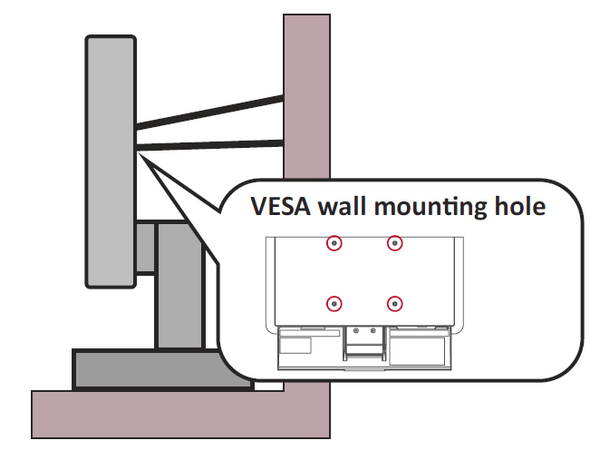
- Fastening the display to a wall or fixed object using cordage or other restraining devices can help support the weight of the display in order to prevent the display from falling over.
- NOTE:
- Restraining device/cordage should be able to withstand 100N force.
- Make sure the cordage is straightened, and any slack is removed. The back of the device shall face the wall to ensure the device cannot tilt under external force.
- Make sure the display does not tilt under external force at any height and rotation angle of the device.
- NOTE:

- If the existing display is going to be retained and relocated, the same considerations as above should be applied.