
LS901HD LS901-4K Mounting the Projector: Difference between revisions
From ViewSonic Documentation
// via Wikitext Extension for VSCode |
// via Wikitext Extension for VSCode |
||
| Line 8: | Line 8: | ||
<ul> | <ul> | ||
<li>Screw type: M4 x 10</li> | <li>Screw type: M4 x 10</li> | ||
<li>Maximum Screw Length: 10 mm</li> | <li>Maximum Screw Length: 10 mm | ||
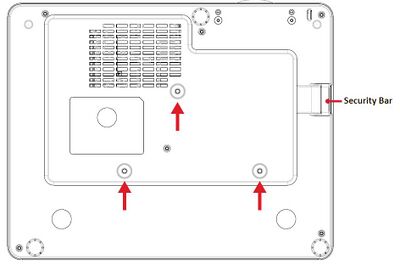
<div class="res-img">[[File:LS710HD_LS751HD_Mount.JPG|400px]]</div> | |||
</li> | |||
</ul> | </ul> | ||
</li> | </li> | ||
</ol> | </ol> | ||
Revision as of 07:30, 5 November 2024
Mounting the Projector
Note: If you buy a third party mount, please use the correct screw size. Screw size can vary depending on the thickness of the mounting plate.
- To ensure the most secure installation, please use a ViewSonic® wall or ceiling mount.
- Ensure the screws used to attach the mount to the projector meet the following specifications:
- Screw type: M4 x 10
- Maximum Screw Length: 10 mm

CAUTION
- Avoid installing the projector near a heat source or air conditioner.
- Keep at least a 10 cm (3.9 in.) gap between the ceiling and the bottom of the projector.