|
|
| (8 intermediate revisions by 2 users not shown) |
| Line 1: |
Line 1: |
| ==Projection Dimensions== | | ==Mounting the Projector== |
| ===16:9 Image on a 16:9 Screen===
| | {{Note|<translate><!--T:1--> If you buy a third party mount, please use the correct screw size. Screw size can vary depending on the thickness of the mounting plate.</translate>}} |
| [[File:Projection_Dimensions.png|700px|]]
| |
| {{Note|<nowiki>(e) = Screen / (f) = Center of Lens</nowiki>}} | |
|
| |
|
| {| class="wikitable" style="text-align:center; width:60%; background-color:#ffffff;"
| | <ol> |
| |-
| | <li> <translate><!--T:2--> To make sure the most secure installation, please use a ViewSonic® wall or ceiling mount.</translate> |
| ! rowspan="2" colspan="2" style="font-weight:bold; background-color:#db0025; color:#ffffff;"| (a) Screen Size
| | </li> |
| ! colspan="4" style="font-weight:bold; background-color:#db0025; color:#ffffff;"| (b) Projection Distance | | <li><translate><!--T:3--> Make sure the screws used to attach the mount to the projector meet the following specifications:</translate> |
| ! rowspan="2" colspan="2" style="font-weight:bold; background-color:#db0025; color:#ffffff;"| (c) Image Height | | <ul> |
| ! colspan="4" style="font-weight:bold; background-color:#db0025; color:#ffffff;"| (d) Vertical Offset
| | <li><translate><!--T:4--> Screw type: M4 x 10</translate></li> |
| |- style="font-weight:bold; background-color:#db0025;"
| | <li><translate><!--T:5--> Maximum Screw Length: 10 mm</translate> |
| | colspan="2" style="color:#ffffff;" | Minimum
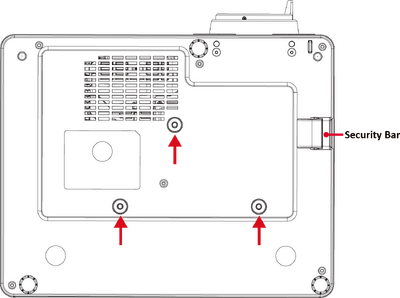
| | <div class="res-img">[[File:LS901HD_Mount.png|400px| <translate><!--T:6--> Mounting points</translate> | alt= <translate><!--T:7--> Mounting points</translate>]]</div> |
| | colspan="2" style="color:#ffffff;" | Maximum
| | </li> |
| | colspan="2" style="background-color:#DB0025; color:#FFF;" | Minimum
| | </ul> |
| | colspan="2" style="background-color:#DB0025; color:#FFF;" | Maximum
| | </li> |
| |- style="font-weight:bold;"
| |
| | in.
| |
| | mm | |
| | in.
| |
| | mm
| |
| | in.
| |
| | mm
| |
| | in.
| |
| | mm
| |
| | in.
| |
| | mm
| |
| | in.
| |
| | mm
| |
| |-
| |
| |30||762||31.38||797||53.35||1355||14.71||374||0.88||22||3.97||101
| |
| |- | |
| |40||1016||41.85||1063||71.10||1806||19.61||498||1.18||30||5.30||135
| |
| |-
| |
| |50||1270||52.28||1328||88.90||2258||24.51||623||1.47||37||6.62||168
| |
| |-
| |
| |60||1524||62.76||1594||106.69||2710||29.42||747||1.76||45||7.94||202
| |
| |-
| |
| |70||1778||73.23||1860||124.45||3161||34.32||872||2.06||52||9.27||235
| |
| |-
| |
| |80||2032||83.66||2125||142.24||3613||39.22||996||2.35||60||10.59||269
| |
| |-
| |
| |90||2286||94.13||2391||160.04||4065||44.12||1121||2.65||67||11.91||303
| |
| |- | |
| |100||2540||104.61||2657||177.80||4516||49.03||1245||2.94||75||13.24||336
| |
| |-
| |
| |110||2794||115.04||2922||195.59||4968||53.93||1370||3.24||82||14.56||370
| |
| |-
| |
| |120||3048||125.51||3188||213.35||5419||58.83||1494||3.53||90||15.88||403
| |
| |-
| |
| |130||3302||135.98||3454||231.14||5871||63.73||1619||3.82||97||17.21||437
| |
| |-
| |
| |140||3556||146.42||3719||248.94||6323||68.64||1743||4.12||105||18.53||471
| |
| |-
| |
| |150||3810||156.89||3985||266.69||6774||73.54||1868||4.41||112||19.86||504
| |
| |-
| |
| |200||5080||209.17||5313||355.59||9032||98.05||2491||5.88||149||26.47||672
| |
| |-
| |
| |250||6350||261.46||6641||444.49||11290||122.57||3113||7.35||187||33.09||841
| |
| |-
| |
| |300||7620||313.78||7970||533.39||13548||147.08||3736||8.82||224||39.71||1009
| |
| |-
| |
| |}
| |
| {{Note|
| |
| :* These figures are for reference purposes only. Please refer to the actual projector for the precise dimensions.
| |
| :* It is recommended that if you intend to permanently install the projector to physically test the projection size and distance using the actual projector before you permanently install it.
| |
| }}
| |
|
| |
|
| ===16:9 Image on a 4:3 Screen===
| | </ol> |
| [[File:Projection_Dimensions.png|700px|]]
| |
| {{Note|<nowiki>(e) = Screen / (f) = Center of Lens</nowiki>}}
| |
|
| |
|
| {| class="wikitable" style="text-align:center; width:60%; background-color:#ffffff;" | | {{Note-yellow|'''<translate>CAUTION</translate>''' |
| |- | | :* <translate>Avoid installing the projector near a heat source or air conditioner.</translate> |
| ! rowspan="2" colspan="2" style="font-weight:bold; background-color:#db0025; color:#ffffff;"| (a) Screen Size
| | :* <translate>Keep at least a 10 cm (3.9 in.) gap between the ceiling and the bottom of the projector.</translate> |
| ! colspan="4" style="font-weight:bold; background-color:#db0025; color:#ffffff;"| (b) Projection Distance
| |
| ! rowspan="2" colspan="2" style="font-weight:bold; background-color:#db0025; color:#ffffff;"| (c) Image Height
| |
| ! colspan="4" style="font-weight:bold; background-color:#db0025; color:#ffffff;"| (d) Vertical Offset
| |
| |- style="font-weight:bold; background-color:#db0025;"
| |
| | colspan="2" style="color:#ffffff;" | Minimum
| |
| | colspan="2" style="color:#ffffff;" | Maximum
| |
| | colspan="2" style="background-color:#DB0025; color:#FFF;" | Minimum
| |
| | colspan="2" style="background-color:#DB0025; color:#FFF;" | Maximum
| |
| |- style="font-weight:bold;"
| |
| | in.
| |
| | mm
| |
| | in.
| |
| | mm
| |
| | in.
| |
| | mm
| |
| | in.
| |
| | mm
| |
| | in.
| |
| | mm
| |
| | in.
| |
| | mm
| |
| |-
| |
| |30||762||28.80||732||48.96||1244||13.50||343||0.81||21||3.65||93
| |
| |-
| |
| |40||1016||38.40||975||65.28||1658||18.00||457||1.08||27||4.86||123
| |
| |-
| |
| |50||1270||48.00||1219||81.60||2073||22.50||572||1.35||34||6.08||154
| |
| |-
| |
| |60||1524||57.60||1463||97.92||2487||27.00||686||1.62||41||7.29||185
| |
| |-
| |
| |70||1778||67.20||1707||114.24||2902||31.50||800||1.89||48||8.51||216
| |
| |-
| |
| |80||2032||76.80||1951||130.56||3316||36.00||914||2.16||55||9.72||247
| |
| |-
| |
| |90||2286||86.40||2195||146.88||3731||40.50||1029||2.43||62||10.94||278
| |
| |-
| |
| |100||2540||96.00||2438||163.20||4145||45.00||1143||2.70||69||12.15||309
| |
| |-
| |
| |110||2794||105.60||2682||179.52||4560||49.50||1257||2.97||75||13.37||339
| |
| |-
| |
| |120||3048||115.20||2926||195.84||4974||54.00||1372||3.24||82||14.58||370
| |
| |-
| |
| |130||3302||124.80||3170||212.16||5389||58.50||1486||3.51||89||15.80||401
| |
| |-
| |
| |140||3556||134.40||3414||228.48||5803||63.00||1600||3.78||96||17.01||432
| |
| |-
| |
| |150||3810||144.00||3658||244.80||6218||67.50||1715||4.05||103||18.23||463
| |
| |-
| |
| |200||5080||192.00||4877||326.40||8291||90.00||2286||5.40||137||24.30||617
| |
| |-
| |
| |250||6350||240.00||6096||408.00||10363||112.50||2858||6.75||171||30.38||772
| |
| |-
| |
| |300||7620||288.00||7315||489.60||12436||135.00||3429||8.10||206||36.45||926
| |
| |}
| |
| | |
| {{Note|
| |
| :*These figures are for reference purposes only. Please refer to the actual projector for the precise dimensions.
| |
| :*It is recommended that if you intend to permanently install the projector to physically test the projection size and distance using the actual projector before you permanently install it.
| |
| }} | | }} |
Mounting the Projector
Note: If you buy a third party mount, please use the correct screw size. Screw size can vary depending on the thickness of the mounting plate.
- To make sure the most secure installation, please use a ViewSonic® wall or ceiling mount.
- Make sure the screws used to attach the mount to the projector meet the following specifications:
- Screw type: M4 x 10
- Maximum Screw Length: 10 mm
CAUTION
- Avoid installing the projector near a heat source or air conditioner.
- Keep at least a 10 cm (3.9 in.) gap between the ceiling and the bottom of the projector.